
Introduction :
Creating a website used to feel complicated, especially for beginners who had no coding or web design experience. You often had to choose a platform, find a suitable design, write the content, arrange different sections, and then figure out how to make everything work together. Today, AI has made this process much easier.
Hostinger AI Website Builder lets you start with a simple description of the website you want to create. Instead of building every part from scratch, you can tell the AI about your business, blog, portfolio, online store, or other project, and it can generate a website based on your idea. You can then edit the text, images, layout, and other elements to make the website fit your needs.
If you are completely new to website creation, How to Use Hostinger AI Website Builder is exactly what this guide will explain. We will go through the process from getting started with the builder to customizing your AI-generated website and publishing it online.
One useful thing about Hostinger is that the website builder is designed to handle many of the technical parts for you. Hosting, domain options, SSL, email, and other website tools can be managed from the same platform, depending on the plan you choose.
In this guide, you will learn How to Use Hostinger AI Website Builder step by step, what you need before starting, how to create your first website, how to customize the AI-generated design, and what to check before publishing your website.
Whether you want to create a simple business website, personal portfolio, blog, landing page, or online store, this guide will help you understand the complete process without making it unnecessarily complicated.
1:What Is Hostinger AI Website Builder?
Hostinger AI Website Builder is a website creation tool that uses artificial intelligence to help you build a website without needing to write code or have advanced web design skills. Instead of starting with a completely blank page, you can describe the type of website you want, and AI creates an initial version based on your description.
For example, if you want to create a website for a small business, you can describe your business, the services you offer, and the type of website you need. Hostinger AI can then generate the basic website structure, including design, content, and relevant sections. You can edit these elements afterward to make the website match your own style and requirements.
If you are wondering How to Use Hostinger AI Website Builder, the good news is that the basic process is quite simple. You don’t have to understand HTML, CSS, or complicated website development to get started. You can begin with your idea, let AI create the first version, and then make changes using the available editing tools.
Hostinger currently provides more than one way to work with AI. Depending on your project and setup, you can use visual drag-and-drop editing or interact with AI through prompts to make changes to your website. This gives beginners an easier way to create a website while still allowing more experienced users to make detailed adjustments.
Another useful part of How to Use Hostinger AI Website Builder is that you are not limited to keeping the first version generated by AI. You can change the text, images, colors, layout, and other website elements until the result looks closer to what you actually want.
If you are planning to create a website for the first time, you can also explore my guide on Best Web Hosting for Beginners to understand what to look for before choosing hosting.
Overall, How to Use Hostinger AI Website Builder is about using AI to make the initial website creation process faster and easier, while still giving you control over the final design and content.
2:How Does Hostinger AI Website Builder Work?
Hostinger AI Website Builder works by turning your idea into a website through a simple description. Instead of choosing every section and design element manually, you first tell the AI what kind of website you want and what it should include. The AI then creates an initial version that you can review and customize.
The process is quite straightforward. You can describe your business, blog, portfolio, online store, or another project in plain language. Hostinger uses that information to generate the first version of your website, which you can then adjust according to your needs.
When learning How to Use Hostinger AI Website Builder, it is helpful to understand that you are not simply generating a website and accepting whatever AI creates. The generated website is a starting point. You can continue editing the text, images, layout, colors, and other parts of the site until it matches your requirements.
Hostinger currently provides AI-powered website creation along with visual editing options. You can describe what you want, let AI create the first version, and then make changes manually or tell the AI what you want to change. This makes the process much easier for beginners who don’t have coding or web design experience.
The basic workflow looks like this:
Describe your idea → AI creates the website → Review the result → Customize the website → Preview it → Publish it
This makes How to Use Hostinger AI Website Builder particularly useful for beginners who want to get a website online without spending a lot of time learning web development. You can start with a simple idea and improve the website as you go.
For example, if you want to create a website for a small photography business, you could tell the AI about your photography services, location, target customers, portfolio, and contact details. The builder can use that information to create an initial website, which you can then personalize with your own photos, services, and contact information. another useful part of the platform is that Hostinger brings several website-related tools together.
Depending on the plan, you can have hosting, a domain, email, SEO tools, and other features managed from the same platform. once you understand this basic process, How to Use Hostinger AI Website Builder becomes much easier to follow because you know what happens at each stage. In the next section, we will look at what you should have ready before you start creating your website.
3:What Do You Need Before Using Hostinger AI Website Builder?
Before you start using Hostinger AI Website Builder, it is helpful to have a clear idea of what you want to create. You don’t need technical knowledge or coding experience, but having some basic information ready can make the website creation process much smoother.
First, you will need a Hostinger account and a suitable hosting plan that includes the AI Website Builder. If you have not chosen a plan yet, you can check the available options on Hostinger AI Website Builder and choose one based on the type of website you want to create.
You should also have a website name or business name ready. This could be your brand name, personal name, blog name, or the name of your project. The AI can use this information when generating your initial website content and design.
Next, think about the purpose of your website. For example, are you creating a business website, personal portfolio, blog, service website, landing page, or online store? Giving Hostinger AI a clear idea of your website’s purpose can help it generate a more
It is also useful to prepare some basic information about your business or project, such as your services, products, location, target audience, contact details, and a short description of what you offer. You don’t need to have everything perfectly written because you can edit the AI-generated content later.relevant starting design.
If you already have your own logo, photographs, product images, or brand colors, keep them ready as well. Using your own visual content can make the AI-generated website feel more personal and consistent with your brand.
You should also decide whether you want to use a new domain or an existing domain. Your domain is the web address people will use to visit your website, so choosing a simple and memorable name is important. If you are looking for information about getting a domain with Hostinger, you can also read my guide on How to Get a Free Domain for 1 Year with Hostinger.
Another thing to consider is the type of content your website will need. A simple business website might need an About page, Services page, Contact page, and homepage, while an online store may need product pages, shopping features, and other store-related sections.
Once you have these basics ready, Hostinger AI Website Builder can take care of much of the initial website creation process. You can start with your information, let AI generate the first version, and then customize it according to your preferences. Start Creating Your Website with Hostinger
You don’t have to make every decision before starting. The main goal is to have a clear website idea and enough basic information for the AI to understand what you want. After the initial website is generated, you can take your time making changes and improving the content.
4:How to Use Hostinger AI Website Builder
Now that you know what Hostinger AI Website Builder is and what you should prepare before starting, it’s time to create your website. The process is designed to be beginner-friendly, so you can start with a simple idea and let AI create the first version for you. Hostinger’s current setup allows you to start from hPanel, choose AI Builder, and then provide an initial prompt describing the website you want to create.
If you are ready to build your website, you can start with Hostinger AI Website Builder and choose a plan that fits your project.
Once you have access to the builder, follow these steps.
Step 1: Log In to Your Hostinger Account
First, log in to your Hostinger account and open your hPanel dashboard. From there, go to the Websites section and look for the option to add a new website. Hostinger’s current AI Builder workflow uses Websites → Add Website → AI Builder to start the website creation process.
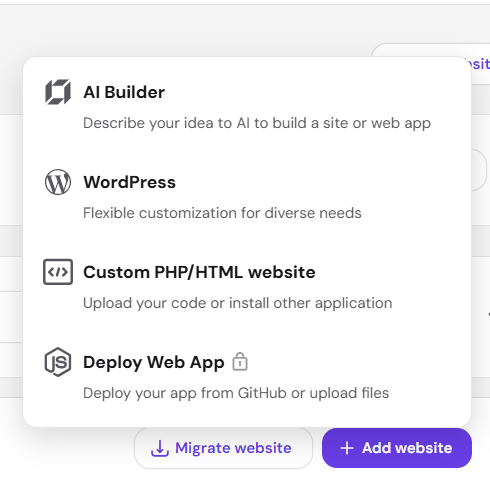
If you are using the builder for the first time, don’t worry if the interface looks unfamiliar. You will be guided through the initial setup before the website is generated.
Step 2: Start a New Website With AI Builder
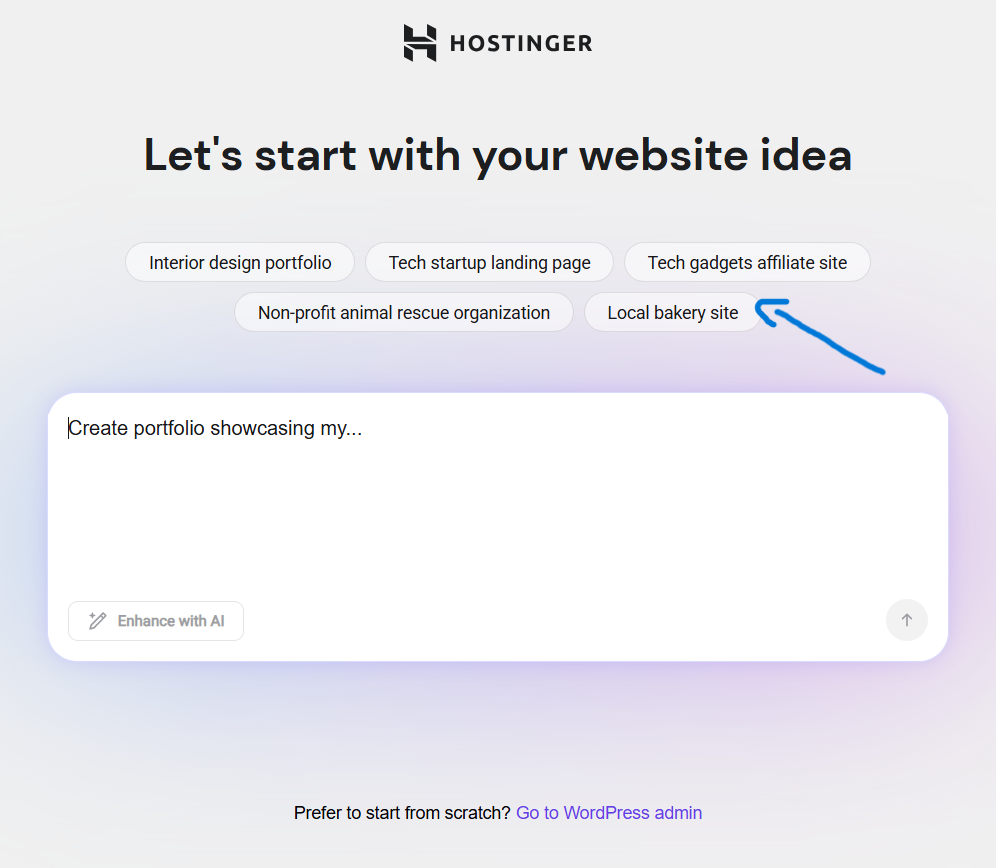
After selecting AI Builder, you will be asked to provide information about the website you want to create. This is where How to Use Hostinger AI Website Builder becomes especially simple because you don’t have to design the entire website from a blank page.
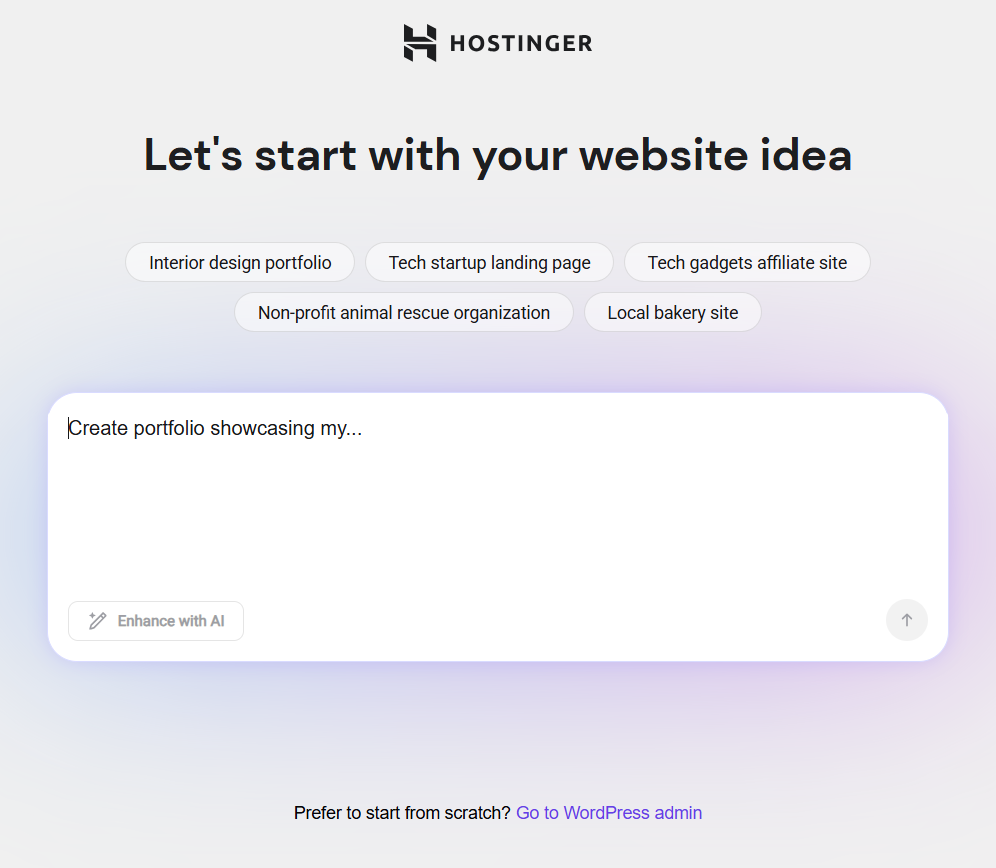
You can describe your website in normal language and explain what the website is for, who it is intended for, and what you want visitors to do. Hostinger recommends using clear and descriptive prompts because more specific instructions generally help the AI produce a result that better matches your requirements.
Step 3: Write a Clear Description for Your Website
Your first prompt is one of the most important parts of the process. Instead of writing something very short like “Create a business website,” give the AI enough information to understand your project.
For example, you could write:
Create a modern website for a small digital marketing agency. The agency provides SEO, social media marketing, and website design services for small businesses. Include a professional homepage, services section, about section, testimonials, contact form, and a clear call-to-action. Use a clean and modern design with a professional look.
This gives the AI information about the business, services, pages, audience, and design direction instead of leaving everything open-ended.
When you’re learning How to Use Hostinger AI Website Builder, remember that the first result doesn’t have to be perfect. Think of your first prompt as the starting point, because you can make changes after the website is generated.
Step 4: Choose How You Want to Build Your Website
Hostinger currently provides different ways to work with its AI Builder. Depending on the available setup, you can choose Manual editing for more direct control or Agentic mode, where you communicate with the AI through prompts and let it make changes based on your instructions.
If you are a beginner and want to make changes by simply describing what you want, the AI-assisted approach can make the process easier. If you prefer to manually control individual elements, the manual editing option gives you more direct control.
Step 5: Choose Your Domain
After providing your website information and selecting your preferred building method, you can choose the domain you want to use. Your domain will be the web address people use to visit your website, so it is a good idea to choose a name that is simple, memorable, and related to your website or brand.
If you are purchasing hosting with Hostinger, some eligible plans may include a free domain for the first year. This can be useful if you are creating a new website and don’t already have a domain name. The exact domain offer and eligible extensions can depend on the plan and current Hostinger offer.
If you don’t have a domain yet, you can check the available plans and domain options on Hostinger while setting up your website.
If you want to understand how Hostinger’s free domain offer works in more detail, you can also read my guide on How to Get a Free Domain for 1 Year with Hostinger. This can help you understand the eligibility and basic process before choosing your plan.
Hostinger’s AI Website Builder may also provide a temporary domain option, allowing you to work on your website before connecting or using your final domain. This can be helpful if you want to finish the design and content first and decide on the permanent domain afterward.
Once your domain is selected or temporarily assigned, you can continue customizing your website before publishing it.
Step 6: Let AI Generate Your Website
Once you’ve provided the required information, the AI will process your instructions and generate the initial version of your website. Depending on your description, the generated site can include the overall layout, content, sections, and design elements that match your website idea.
This is where the main benefit of How to Use Hostinger AI Website Builder becomes clear. Instead of spending hours creating every section from scratch, you get a starting website that you can improve and personalize.
After the website is generated, take some time to look through the entire site. Don’t immediately publish it. Check the text, images, navigation, buttons, contact information, and overall design first.
You can then give the AI specific instructions to improve individual parts of the website. Hostinger recommends keeping follow-up prompts focused on one change at a time rather than asking the AI to make many unrelated changes in one large prompt.
For example, instead of saying:
Make my website better.
You could say:
Change the homepage hero section to a clean professional design and make the main call-to-action button more visible.
This type of instruction gives the AI a much clearer direction.
If you’re ready to start building, Try Hostinger AI Website Builder and use a detailed description rather than a one-line prompt. A little more information at the beginning can save you time when customizing the website later.
By following these steps, How to Use Hostinger AI Website Builder becomes a simple process: describe your idea, choose how you want to build, select a domain, let AI generate the website, and then refine the result until you’re happy with it.
5: How to Customize Your AI-Generated Website
Once Hostinger AI has created the first version of your website, the next step is customization. The AI-generated website gives you a starting point, but you should always review and personalize it before publishing. This is where you can make the website look and feel more like your own brand.
Learning How to Use Hostinger AI Website Builder doesn’t mean you have to keep everything AI generates. You can change the content, images, colors, fonts, sections, and other elements to create a website that matches your actual needs.
Start by reviewing the homepage from top to bottom. Look at the main heading, introduction, images, buttons, services, testimonials, and contact information. If something doesn’t represent your business or project correctly, edit it rather than leaving the AI-generated version unchanged.
You can also change the website text to make it more personal. AI-generated content can be a useful starting point, but your own experience, services, business information, and writing style will make the website more authentic. Make sure names, prices, locations, contact details, and other important information are accurate before publishing.
Images are another important part of customization. If the AI has selected images that don’t match your business, replace them with your own photographs or more relevant visuals. For a business website, using real photos of your team, products, office, or work can help visitors understand what you actually offer.
You can also adjust the colors and fonts of your website. If you already have brand colors, try to use them consistently across headings, buttons, backgrounds, and other important elements. Keeping the typography simple and readable can also make the website easier to use.
If your website needs additional sections, you can add them as well. For example, a service business might need a services section, testimonials, FAQ section, or contact area. A portfolio website might benefit from project galleries, while an online store may need product-related sections.
One of the useful things about Hostinger AI Website Builder is that you can continue making changes after the initial website has been generated. Instead of starting again from scratch, you can gradually improve individual parts of the website until the overall design and content feel right.hostinger.com
If you are building your first website, don’t try to make every section perfect immediately. Start with the most important information visitors need, then improve the design and content as you go. This approach makes How to Use Hostinger AI Website Builder much less overwhelming for beginners.
For example, if the AI creates a homepage with a generic heading such as “Welcome to Our Website,” you can replace it with something more specific, such as “Professional Website Design Services for Small Businesses.” A clear heading immediately tells visitors what the website is about.
After making your changes, preview the website on both desktop and mobile screens. A design that looks good on a large screen may need adjustments on a smaller phone screen, so checking both views before publishing is important.
If you want to create a website with Hostinger and start customizing your own AI-generated design, you can try Hostinger AI Website Builder and adjust the generated website according to your project.
Remember, the goal of How to Use Hostinger AI Website Builder is not simply to generate a website as quickly as possible. The goal is to use AI to handle the initial work and then add your own content, information, and style so the final website feels genuinely yours.
Once your website looks the way you want, the next step is to make sure it has all the important pages and content visitors may need before you publish it.
6: How to Add Pages and Content to Your Website
After customizing the main design, the next step is to make sure your website has the right pages and useful information. An AI-generated website may already include some basic sections, but you should review them and add or remove pages according to the purpose of your website.
When learning How to Use Hostinger AI Website Builder, it is important to remember that a good website is not only about its design. Visitors should also be able to quickly find the information they are looking for. For example, a business website should clearly explain what the business does, what services it provides, and how visitors can get in touch.

For most websites, a Home page is the main starting point. It should give visitors a quick understanding of what your website is about. Keep the main heading clear, explain your primary service or purpose, and include an appropriate call-to-action so visitors know what to do next.
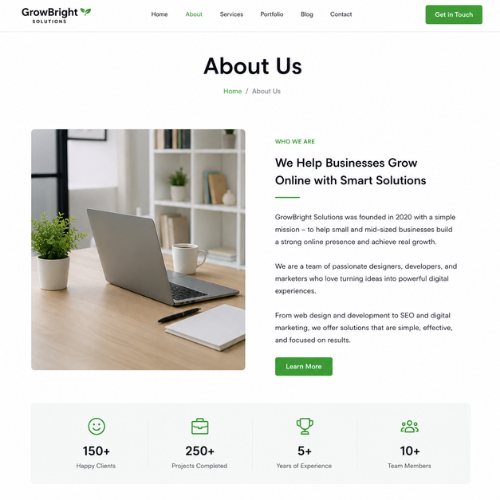
An About page can help visitors learn more about you, your business, or your brand. You can explain your background, experience, mission, or the reason behind your website. Instead of keeping generic AI-generated information, replace it with details that are actually true about you or your business.
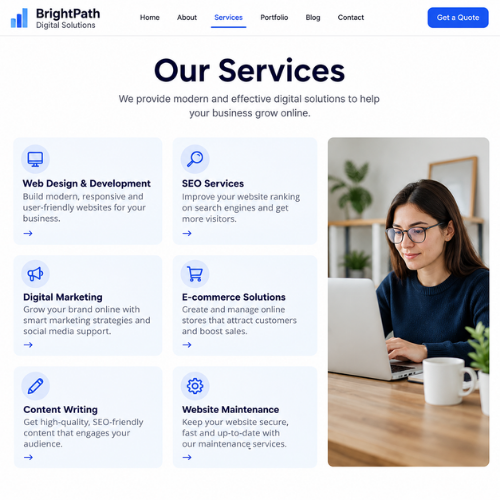
If you provide services, consider adding a Services page. Explain each service in simple language and include important details that potential customers may want to know. If you sell products, your website should instead focus on clear product information, images, prices, and purchasing options.
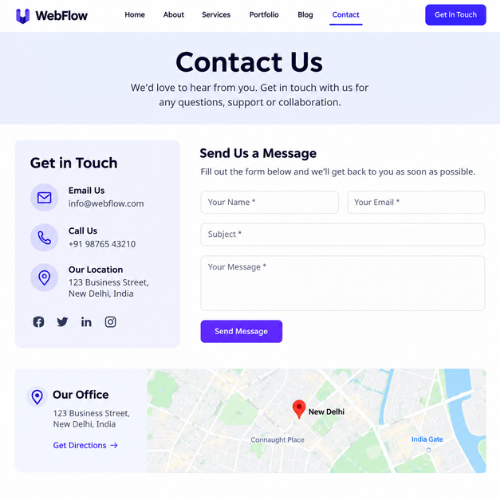
A Contact page is also important for most websites. Add the information visitors need to reach you, such as an email address, phone number, business location, or contact form. Before publishing, make sure all contact information is correct and that your forms actually work.
Depending on your website type, you may also want to add pages such as a Blog, Portfolio, FAQ, Testimonials, or Pricing page. You don’t need to create every possible page. Only include pages that provide real value to your visitors.
If you are creating a blog or WordPress website instead of using the AI Website Builder, you can also check my guide on How to Install WordPress Step by Step to understand the WordPress setup process.
You can add your own content to the website after the AI has generated the initial version. This includes your own text, images, business details, links, buttons, and other information. Using original content is important because it makes the website more useful and gives visitors a better understanding of what you actually offer.
If you’re building a new website and want to use Hostinger’s AI-powered tools, you can Start Creating Your Website with Hostinger AI and customize the pages according to your needs.
Before moving forward, go through every page and check for incorrect AI-generated information. Look carefully at names, addresses, phone numbers, prices, service descriptions, images, and links. AI can create a good starting point, but you are responsible for making sure the final information is accurate.
Once your pages and content are ready, preview the entire website and test the navigation. Click each menu item and button to make sure visitors can move from one page to another without problems.
If you want to make further changes, you can continue editing your website with Hostinger AI Website Builder before publishing it. Taking a little extra time at this stage can help you avoid simple mistakes after the website goes live.
Adding useful pages and original content is an important part of How to Use Hostinger AI Website Builder because the AI creates the foundation, while your information makes the website genuinely useful to visitors.
7:How to Connect a Domain to Your Website
Once your website design and content are ready, you need a domain name so visitors can access your website using a proper web address. If you selected a domain during the initial setup, Hostinger may already have it connected to your website. If you are using an existing domain, you may need to configure it before the website can be accessed through that address.
When learning How to Use Hostinger AI Website Builder, it’s important to understand that your website and domain are two different things. The website contains your pages, content, images, and design, while the domain is the address visitors enter in their browser to find your website.
If you purchased an eligible Hostinger plan with a free domain offer, you can use the included domain for your new website according to the terms of that offer. If you already own a domain, you can use that domain instead, provided it is configured correctly with your Hostinger website.
You can manage your domain and website from your Hostinger account. If you’re using a new domain, make sure the domain name is spelled correctly and represents your website or brand. A short and easy-to-remember domain is generally easier for visitors to type and remember.
If you haven’t chosen your hosting plan yet, you can explore Hostinger’s AI Website Builder and check which domain and website options are available with your plan.
For an existing domain, Hostinger provides the necessary configuration options through its control panel. The exact steps can depend on where your domain is registered and how your website is set up, so it’s important to follow the instructions shown in your Hostinger account rather than changing DNS settings randomly.
After connecting the domain, give the changes some time to take effect. Domain and DNS changes may not always work immediately, so don’t worry if the website doesn’t open on the new domain straight away.
Once the domain is working, open it in a browser and check whether your homepage loads correctly. Also test the navigation menu, buttons, contact forms, images, and other important elements.
If you’re using Hostinger for the first time, you can also read my Best Web Hosting for Beginners guide to understand some of the basic hosting terms and features before making further changes.
The most important thing is to avoid making unnecessary DNS changes if you are not sure what they do. If Hostinger provides specific instructions for your domain, follow those instructions carefully.
Once your domain is connected and your website is loading correctly, you’re almost ready to publish.
8:How to Preview and Publish Your Website
Before publishing your website, take a few minutes to review everything carefully. Even though Hostinger AI can create the initial website for you, the generated version should not be treated as the final version without checking it. Small errors in text, images, links, or contact details can affect the visitor’s experience.
When learning How to Use Hostinger AI Website Builder, previewing your website is an important step because it gives you a chance to see how the website will look before visitors start using it.
Start by checking the homepage from top to bottom. Make sure the main heading clearly explains what your website is about and that the most important information is easy to find. Look at the buttons and make sure they lead to the correct pages.
Next, check your website’s navigation menu. Click each menu item and confirm that the correct page opens. If you have added pages such as About, Services, Portfolio, Blog, or Contact, make sure they are all accessible.
You should also review your website on mobile and desktop screens. Many visitors browse websites from their phones, so the mobile version should be easy to read and navigate. Check whether text is readable, images fit properly, buttons are easy to tap, and sections don’t look crowded.
Pay close attention to the content generated by AI. Read every important paragraph and replace generic information with your own accurate details. Check business names, addresses, phone numbers, email addresses, prices, service descriptions, and other information before publishing.
Images should also be checked carefully. Make sure they are relevant to your website and don’t contain anything misleading. If you have your own photographs or brand images, replacing generic AI-generated visuals can make your website feel more authentic.
You should also test important forms and buttons. If your website has a contact form, submit a test message to make sure it works correctly. Similarly, check email addresses, social media links, call-to-action buttons, and any other links visitors may use.
If you notice something that needs to be changed, you can continue editing the website before publishing. You can also use Hostinger’s AI tools to describe specific changes you want to make. If you’re ready to continue building your website, you can try Hostinger AI Website Builder and make the final adjustments before going live.
Once everything looks correct, you can publish the website through the builder. The exact button or interface can vary depending on the current Hostinger setup, but the publishing process is designed to make your website available on its connected domain.
After publishing, don’t stop at the builder. Open your live website in a new browser tab and check it again as a normal visitor. Visit different pages, test the navigation, check images, and make sure your domain opens correctly.
If you later notice a mistake, you can return to the website editor, make the required changes, and update the live website.
This final review is an important part of How to Use Hostinger AI Website Builder because generating a website is only the beginning. Your final checks help ensure that the website is accurate, functional, and ready for visitors.
If you haven’t started your website yet, you can Start Your Website with Hostinger AI and follow the steps covered in this guide.
9:Hostinger AI Website Builder Features
Hostinger AI Website Builder includes several tools designed to make website creation easier for beginners. Instead of having to handle every part of website development manually, you can use AI-assisted tools to create a starting website and then customize it according to your needs.
One of the main features is AI-powered website generation. You provide information about the website you want to create, and the AI can generate an initial design and content based on your description. This can save time compared with starting from a completely blank website.
Another useful feature is AI-assisted content creation. If you’re not sure what to write for a particular section, AI can help you create initial text that you can then review and edit. This can be useful for sections such as introductions, service descriptions, and other website copy. However, you should always check AI-generated content and replace generic information with details that are actually relevant to you.
Hostinger also provides AI image-related tools as part of its website-building features. Depending on the available tools and your plan, AI can help with creating or working with visuals for your website. You can still use your own images when you want your website to have a more personal and authentic appearance. ([hostinger.com
The builder also provides visual editing tools, allowing you to make changes to your website without needing to write code. You can adjust different parts of the design, change content, and customize the appearance of your pages using the available editor.
Another useful feature is AI-assisted editing through prompts. Instead of manually searching for every setting, you can describe the change you want and let the AI help you make it. For example, you might ask it to change a section’s layout, rewrite some text, or add a new section.
If you want to explore these tools yourself, you can Try Hostinger AI Website Builder and see which features are available with your chosen plan.
SEO-related tools can also help you prepare your website for search engines. Depending on the current plan and builder features, Hostinger provides tools that can help with areas such as SEO settings and website optimization. However, using these tools does not automatically guarantee higher Google rankings. Your content quality, website structure, technical performance, and overall user experience still matter.
For people creating an online store, Hostinger also offers e-commerce functionality on supported plans. This can allow you to create product pages and manage other parts of an online store without building the entire system from scratch. The exact features available depend on the plan and current Hostinger offering.
Another advantage is having different website-related services available through the same Hostinger account. Depending on your plan, this can include hosting, domain management, SSL, email, and other website tools.
For beginners, this combination can make the overall website-building process less complicated because you don’t necessarily need to manage multiple platforms for every part of your website.
The important thing to remember is that Hostinger AI Website Builder is a tool to help you create and manage your website, not a replacement for your own decisions. AI can generate the initial design and content, but you should still review everything and make the final website reflect your own purpose, brand, and audience.
If you’re learning How to Use Hostinger AI Website Builder, understanding these features will help you decide which tools are actually useful for your project instead of trying to use every AI feature simply because it is available.
10:What Can You Create With Hostinger AI Web Builder?
One of the biggest advantages of Hostinger AI Website Builder is that you are not limited to creating just one type of website. You can use it for different personal, professional, and business projects, depending on what you want your website to achieve.

If you are a small business owner, you can create a business website to introduce your company, explain your services, display your contact information, and give potential customers an easy way to reach you. You can describe your business to the AI and use the generated website as a starting point before adding your own content and branding.
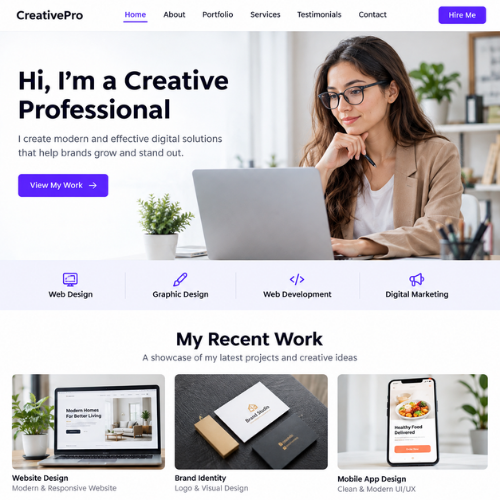
For someone who works independently, a portfolio website can be a useful option. Photographers, designers, writers, developers, artists, and freelancers can use a website to showcase their work and explain what they offer. You can add your own projects, images, testimonials, and contact information after the initial website has been generated.
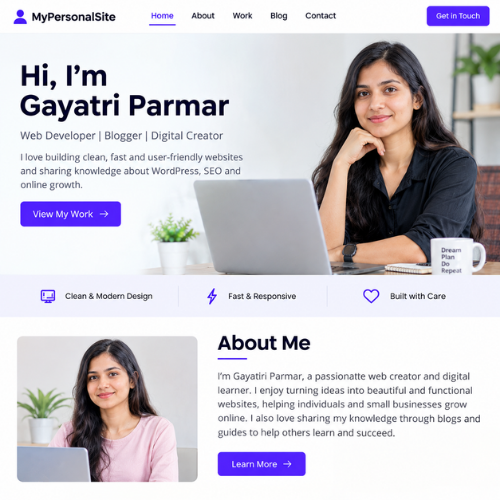
You can also create a personal website with Hostinger AI Website Builder. This could be useful if you want an online presence where you can introduce yourself, share your interests, display your work, or provide links to your other online profiles.
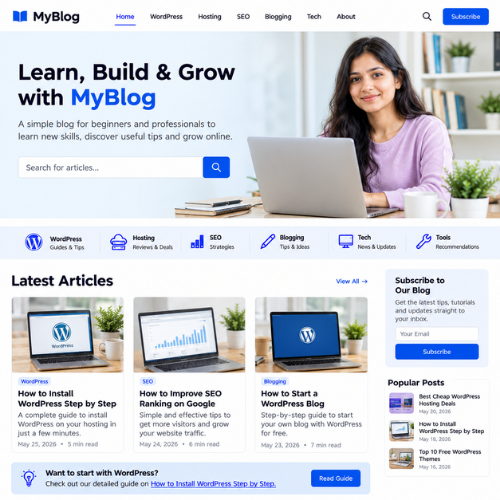
If you are planning to start writing online, a blog website is another possibility. You can create the initial design with AI and then add your own articles, categories, images, and other content. If you are specifically interested in WordPress instead, you can also check my guide on How to Install WordPress Step by Step, which explains the WordPress setup process in detail.
A service-based website can also work well with an AI website builder. For example, a digital marketing agency, salon, photography business, consultant, tutor, or local service provider can create pages explaining their services, pricing, experience, and contact options.
If you want to sell products online, you can also look at online store functionality available with supported Hostinger plans. You can create product-related pages and customize the website around your store. The exact e-commerce features available can depend on the plan and current Hostinger offering.
You can explore Hostinger AI Website Builder if you want to see which website-building and e-commerce options are currently available for your project.
Another option is a landing page. If you are promoting a particular service, product, event, campaign, or offer, a focused landing page can present the most important information without requiring a large website.
The important thing is to choose the website type based on your actual goal. Don’t create unnecessary pages or features simply because the AI can generate them. A simple website with clear information and an easy-to-use design can often be more useful than a website filled with unnecessary sections.
When learning How to Use Hostinger AI Website Builder, you can start with a basic version of your website and then expand it as your needs grow. For example, a freelancer might begin with a homepage, portfolio, and contact page and later add a blog, testimonials, or additional service pages.
If you’re ready to experiment with different website ideas, you can create your website with Hostinger AI and use a detailed description to tell the AI exactly what you want to build.
Overall, How to Use Hostinger AI Website Builder becomes much easier when you first understand your website’s purpose. Once you know whether you need a business website, portfolio, blog, online store, or landing page, you can give the AI clearer instructions and spend less time correcting the initial result.
11:Hostinger AI Website Builder Pros and Cons
Like any website-building tool, Hostinger AI Website Builder has both advantages and limitations. Understanding both sides can help you decide whether it is suitable for your website instead of choosing it only because it uses AI.
Pros
One of the biggest advantages is ease of use. You can describe the website you want in normal language, and AI can create the initial version for you. Hostinger also provides visual editing, so you can change the design, text, images, and layout without needing coding knowledge.
Another advantage is speed. Instead of starting with a blank page and building every section yourself, you can generate a starting website quickly and then spend your time improving it. This can be particularly useful for beginners, freelancers, and small businesses that want to establish an online presence without a complicated setup.
The builder also brings several tools together in one place. Depending on the plan, Hostinger provides hosting, a custom domain, email, SSL, SEO tools, and other website features, so you don’t necessarily need to manage separate services for every part of your website.
You also get flexibility after the AI generates your website. You are not locked into the first design. You can manually edit different elements or use AI prompts to request changes. This means you can start with an AI-generated foundation and gradually make the website more personal.
If you want to try these features yourself, you can [explore Hostinger AI Website Builder and see which tools are available with the plan you choose.
Cons
The first limitation is that AI-generated content may need editing. Even when the AI creates a good-looking website, the text may sound generic or may not accurately describe your business. You should always review important information and replace generic content with your own original details.
Another thing to remember is that AI does not always understand exactly what you have in mind. A prompt can produce a website that is different from what you expected, so you may need to give additional instructions or manually adjust the result. Hostinger itself notes that AI-generated results can vary because AI works probabilistically rather than following completely fixed rules.
There can also be plan-dependent limitations Features such as the number of websites, AI credits, ecommerce capabilities, and other tools vary between plans. For example, Hostinger’s current India plans show different AI credits and website/ecommerce features across Premium, Unlimited, and Cloud Startup plans.
Another consideration is that an AI website builder may not be the ideal choice for everyone. If you need a very specific platform, advanced functionality, or the extensive plugin and theme ecosystem available with WordPress, you may prefer a different approach.
If you are comparing website-building options, my Best Web Hosting for Beginners guide can also help you understand the broader hosting options before making a decision.
Overall, How to Use Hostinger AI Website Builder is a good option when your priority is creating a website quickly and with minimal technical work. However, you should still treat AI as a starting point rather than expecting it to make every decision perfectly for you.
If you want to get started, you can try Hostinger AI Website Builder and customize the generated website according to your own requirements.
The right choice ultimately depends on your project. For a simple business website, portfolio, blog, landing page, or many types of online stores, an AI builder can save considerable time. For projects requiring highly specialized functionality, however, another platform may give you more control.
12:Is Hostinger AI Web Builder Good for Beginners?
Yes, Hostinger AI Website Builder can be a good option for beginners who want to create a website without dealing with complicated coding or web development. Its AI-powered approach allows you to start with a simple description and generate a website that you can then customize using the available editing tools.
For someone creating their first website, the biggest benefit is that you don’t have to start from a completely blank page. When you use How to Use Hostinger AI Website Builder, you can describe your idea, let AI create the initial website, and then focus on changing the parts that matter most to you.
The visual editing experience also makes the process easier. You can work with your website’s content and design without needing to understand HTML, CSS, or JavaScript. This can be especially helpful if your main goal is to get a professional-looking website online rather than learn website development from the beginning.
Another benefit for beginners is having multiple website tools available through the same platform. Depending on the plan, Hostinger offers hosting, domain options, SSL, email, AI tools, and other features that can be managed from your account. This means you don’t necessarily need to find separate services for every basic website requirement.
If you want to start your first website, you can try Hostinger AI Website Builder and use the steps in this guide to create and customize your website.
However, being beginner-friendly doesn’t mean you should publish everything AI generates without checking it. You should review the content, replace generic text, verify your business information, check images, test links, and make sure the website represents you accurately.
It’s also worth remembering that AI is a tool, not a complete replacement for your own decisions. You still need to decide what information your visitors should see, which pages your website needs, what your brand should look like, and what action you want visitors to take.
For example, if you’re creating a small business website, AI can help create the basic structure, but you should provide accurate information about your services, prices, location, opening hours, contact details, and business experience.
The same applies to a blog. AI can help you get the website structure started, but your articles should provide useful, original information written for your readers. If you are interested in WordPress blogging specifically, you can also read my How to Start a WordPress Blog with Hostinger guide.
Another thing beginners should consider is their future needs. A simple AI-generated website may be enough when you’re starting, but your requirements could become more advanced as your business or project grows. Before choosing a platform, think about whether you will need additional functionality later.
This is where understanding How to Use Hostinger AI Website Builder properly becomes important. The goal isn’t just to create a website quickly; it’s to understand what the builder can do, what you need to customize yourself, and whether its features match your long-term plans.
If your goal is to create a simple website without spending a lot of time learning technical skills, Hostinger AI Website Builder can be a practical starting point.
Overall, How to Use Hostinger AI Website Builder is relatively straightforward for beginners because the AI handles much of the initial setup while the visual editor gives you control over the final result. As long as you review and personalize the generated website before publishing, it can be a convenient way to get started online.
13:Hostinger AI Website Builder vs WordPress
If you’re deciding between Hostinger AI Website Builder and WordPress, the right choice depends mainly on how much control you want and what type of website you plan to create. Both can be useful, but they offer a different experience.
The biggest difference is the way you build and manage your website. With Hostinger AI Website Builder, you can start by describing what you want and let AI create a website for you. You can then customize the generated design using the available editing tools. WordPress, on the other hand, gives you a broader ecosystem of themes, plugins, and customization options, but it can require more setup and learning.
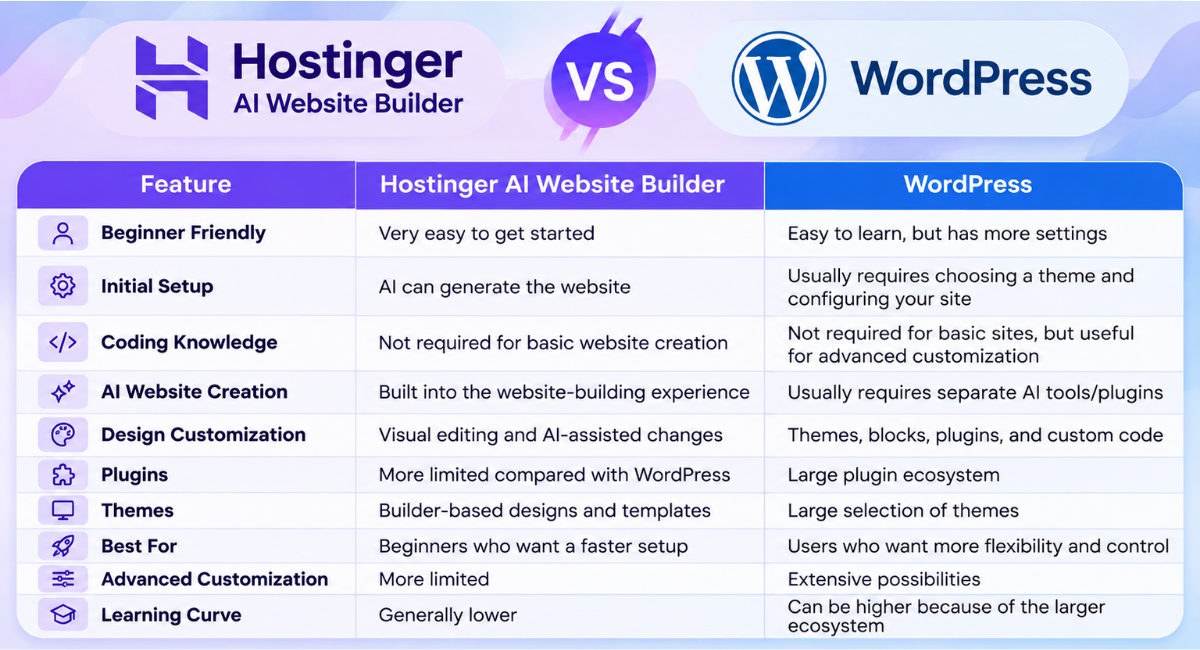
If your priority is speed and simplicity, Hostinger AI Website Builder can be a convenient choice. You can start with an idea, let AI generate the initial website, and then customize it instead of building every component from scratch. You can explore Hostinger AI Website Builder if you want to see how the AI-based approach works.
WordPress may be a better choice if you want access to a large ecosystem of plugins and themes or expect to make extensive customizations in the future. For example, if you want to build a content-heavy blog, membership website, or website with specialized functionality, WordPress can provide more options.
Another difference is maintenance and management. With WordPress, you may need to manage themes, plugins, updates, backups, security settings, and other components depending on your hosting setup. With a website builder, much of the experience is managed through the builder’s own platform.
If you are completely new to WordPress, my How to Install WordPress Step by Step guide can help you understand how WordPress installation works.
The choice also depends on your website’s purpose. A small business website, portfolio, service website, landing page, or simple online store may work well with an AI website builder. A more complex project that requires specialized plugins or extensive customization may benefit from WordPress.
For beginners who don’t want to spend a lot of time learning technical concepts, How to Use Hostinger AI Website Builder can be a simpler starting point. You can focus more on your content and business instead of spending your first few hours configuring a website.
At the same time, choosing WordPress doesn’t mean you need to know coding. WordPress has become much easier to use, especially with modern visual editors and page builders. The main difference is that WordPress gives you more choices, which can be an advantage but can also feel overwhelming when you’re just starting.
If you’re still unsure which option is right for you, you can also read my Best Free WordPress Themes guide to see how much design flexibility WordPress can provide.
In simple terms, choose Hostinger AI Website Builder if you want a quick and straightforward way to create a website with AI assistance. Choose WordPress if you want greater flexibility, a huge plugin ecosystem, and more control over how your website develops over time.
If you want to start with an AI-powered approach, you can try Hostinger AI Website Builder and see whether its workflow matches your needs.
Understanding How to Use Hostinger AI Website Builder alongside the differences between AI website builders and WordPress will make it easier to choose the platform that fits your goals.
14.Frequently Asked Questions
1. Is Hostinger AI Website Builder free?
Hostinger AI Website Builder is included with eligible Hostinger website-building plans rather than being a completely free standalone website builder. The exact features, AI credits, storage, and other limits can vary depending on the plan you choose. It is best to check the current plan details before purchasing. Hostinger AI Website Builder plans
2. Do I need coding knowledge to use Hostinger AI Website Builder?
No. You don’t need coding knowledge to create a basic website with Hostinger AI Website Builder. You can describe the website you want, let AI generate the initial version, and then customize it using the available visual editing tools. This makes it particularly suitable for people who are new to website creation.
3. Can I create a website with Hostinger AI?
Yes. You can use Hostinger’s AI-powered website creation tools to generate a website based on your description and then customize the result. You can create different types of websites, including business websites, portfolios, blogs, service websites, landing pages, and supported online stores.
4. Can I use my own domain with Hostinger AI Website Builder?
Yes. You can use a domain with your Hostinger website, including an existing domain when it is configured correctly. If you are purchasing a new hosting plan, some eligible Hostinger plans may also include a free domain for the first year, subject to the current offer and eligibility requirements.
If you want to learn more about Hostinger’s free-domain offer, you can read my How to Get a Free Domain for 1 Year with Hostinger guide.
5. Can I edit an AI-generated website?
Yes. The website generated by AI is not something you have to keep exactly as it is. You can customize the content, images, layout, colors, fonts, and other available elements. You can also use AI-assisted prompts to request certain changes, depending on the editing mode and features available with your plan.
This is an important part of How to Use Hostinger AI Website Builder because the first AI-generated version should be treated as a starting point. Reviewing and personalizing it can make the final website more useful and authentic.
6. Can I create an online store with Hostinger AI Website Builder?
Yes, Hostinger supports online-store creation with its website-building platform on eligible plans. You can create a store and add products, images, descriptions, prices, and other store information. The exact e-commerce features available depend on the plan and current Hostinger offering. Hostinger AI Website Builder
If you are planning a larger WordPress-based store instead, you may also want to read my How to Create an Online Store with WordPress guide.
7. Is Hostinger AI Website Builder good for beginners?
Yes, it can be a good option for beginners who want to create a website without dealing with complicated coding or development. The AI can handle much of the initial website creation, while the visual editor lets you customize the result.
However, beginners should still review AI-generated content, images, links, and business information before publishing. AI can speed up the process, but your own review is important for creating an accurate and useful website.
8. Can I switch from Hostinger AI Website Builder to WordPress?
If you later decide that you need the flexibility of WordPress, you can create or move your website to a WordPress setup, but switching is not necessarily a one-click conversion of the existing AI Builder website. The content and design may need to be recreated or transferred depending on what you want to keep.
If you decide to move to WordPress, my How to Install WordPress Step by Step guide can help you understand the basic WordPress setup process.
Overall, How to Use Hostinger AI Website Builder is a straightforward process for beginners, but the best platform depends on the type of website you want to build and how much customization you expect to need in the future.
15:Final Verdict
If you want to create a website without spending a lot of time learning coding or complicated web development, Hostinger AI Website Builder can be a practical option. It lets you start with a simple description, generate an initial website with AI, and then customize the design and content according to your needs.
The biggest advantage is the simplicity of the process. Instead of starting with a blank page, you can give AI information about your website and use the generated result as your starting point. You can then change the text, images, colors, sections, and other elements until the website feels more personal and suitable for your visitors.
Throughout this guide on How to Use Hostinger AI Website Builder, we covered the process from preparing your website information to generating, customizing, previewing, and publishing your website. We also looked at the available features, different types of websites you can create, and how the AI Website Builder compares with WordPress.
If you’re planning to build a simple business website, portfolio, personal website, blog, landing page, or supported online store, you can try Hostinger AI Website Builder and see whether it fits your needs.
However, don’t expect AI to make every decision perfectly. The generated website is a starting point, so take time to replace generic content, check important information, use relevant images, test your links and forms, and make the design match your brand.
For users who want maximum flexibility and access to a large ecosystem of themes and plugins, WordPress may be a better choice. If you’re interested in WordPress, you can also read my How to Install WordPress Step by Step guide before deciding which platform is right for you.
For beginners who mainly want a simple and faster way to get a website online, Hostinger AI Website Builder can save time and reduce the technical work involved in getting started. You can [start building your website with Hostinger]and customize the AI-generated result based on your own requirements.
Ultimately, How to Use Hostinger AI Website Builder is not about letting AI build everything and publishing it immediately. The best approach is to use AI for the initial work, then add your own ideas, information, branding, and careful review. That way, you get the convenience of AI while still maintaining control over the website you publish.
If you’re a beginner and want to create your first website with less technical complexity, Hostinger AI Website Builder is worth considering as a starting point.