
Introduction :
Choosing the right hosting is an important decision when you are starting a WordPress website. Your hosting can affect your website’s speed, security, reliability, and how easily you can manage your website.
Hostinger is a popular hosting provider that many bloggers, small businesses, freelancers, and website owners consider when starting a website. But the important question is: Is Hostinger actually worth it for WordPress?
In this Hostinger Review 2026, we’ll look at Hostinger’s WordPress hosting, pricing, features, performance, security, customer support, pros and cons, and overall value.
We’ll also look at Hostinger from both an India and international perspective, because Hostinger serves customers in many different countries. Pricing and available plans can vary depending on your location, currency, billing period, and current offers, so it’s important to understand what you are actually getting before choosing a plan.
If you are planning to start a WordPress blog, business website, portfolio, or small online store, this review will help you understand whether Hostinger is a suitable option for your website.
We’ll also cover which users may benefit most from Hostinger, who may need a more powerful hosting solution, and how to choose a plan based on your website’s current needs.
1.What Is Hostinger?
Hostinger is a web hosting company that provides hosting services for people and businesses that want to create a website. It offers different types of hosting, including WordPress hosting, web hosting, cloud hosting, and VPS hosting, so users can choose an option based on their website’s needs.
For beginners, one of the main advantages of Hostinger is that it keeps website management relatively simple. You can manage your hosting, domain, website files, email, and other settings from its hosting control panel. If you’re also looking for information about getting a domain, you can read my How to Get a Free Domain for 1 Year with Hostinger guide to understand how the free domain option works with eligible Hostinger plans.
Hostinger also supports WordPress, which makes it an option for bloggers, small businesses, portfolio websites, and other users who want to build their website with WordPress
If you’re completely new to WordPress, you may also find my How to Install WordPress Step by Step guide useful. It explains the basic WordPress installation process in a beginner-friendly way.
One thing to keep in mind is that Hostinger offers different plans with different features and resource limits. You don’t necessarily need the most expensive plan when starting out. The right choice depends on the type of website you want to create, how much traffic you expect, and how much room you need for future growth.
In this Hostinger Review 2026, we’ll look beyond the basic features and see how Hostinger performs in areas such as WordPress usability, pricing, performance, security, support, and overall value.
2.Is Hostinger Good for WordPress?
Yes, Hostinger can be a good option for WordPress, especially if you are a beginner or starting a small website. It offers WordPress-focused tools that can make it easier to install, manage, and maintain a WordPress website without dealing with too many technical settings.
One of the useful things about Hostinger is that WordPress can be set up through its hosting dashboard, so you don’t have to manually handle every part of the installation process. Once WordPress is installed, you can manage your website from the familiar WordPress dashboard and use your hosting panel for hosting-related settings.
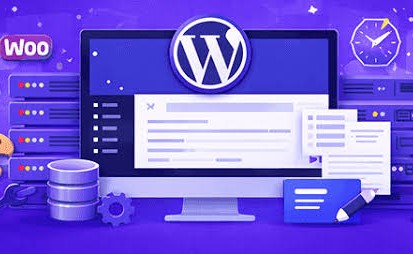
Hostinger also includes features such as SSL, backups on eligible plans, performance tools, CDN options, and security features, which can be useful for keeping a WordPress website secure and running smoothly. The exact features depend on the plan you choose, so it’s worth checking the details before purchasing.
If you’re planning to create a blog with WordPress, you can also check my How to Install WordPress Step by Step guide, where I explain the installation process in detail.
Another thing that makes Hostinger appealing to beginners is the ability to start with a basic plan and upgrade later if your website needs more resources. This can be helpful if your website starts receiving more visitors as it grows.
👉 Check Hostinger WordPress Hosting Plans
Overall, Hostinger is worth considering if you want beginner-friendly WordPress hosting with useful features and the flexibility to upgrade as your website grows. However, your final choice should depend on your website’s requirements, budget, and the features included in the plan you choose.
3.Hostinger Plans and Pricing in 2026
Price is important when choosing a hosting plan, but it isn’t the only factor to consider. The right plan depends on how many websites you want to create, the traffic you expect, your storage needs, and the specific features you require.
Hostinger offers a variety of hosting plans, allowing beginners to start with a smaller plan and upgrade to a larger one as their website grows.
Hostinger Prices for India
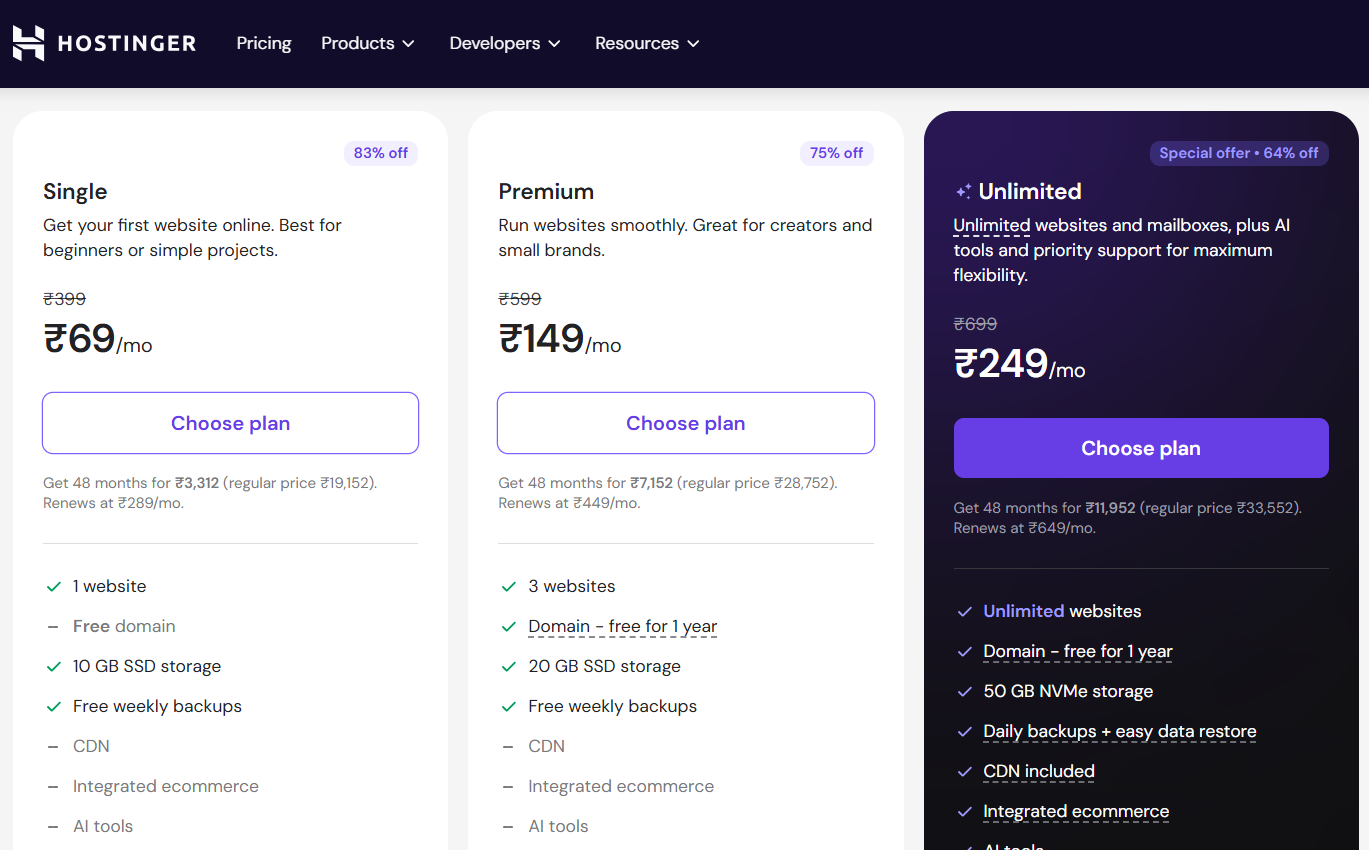
For users in India, Hostinger displays its hosting prices in Indian Rupees (₹). Available plans, starting prices, renewal rates, and included features are subject to change, so it is advisable to check the current pricing before making a purchase.
If you are comparing affordable hosting options, you might also want to read my Best Cheap WordPress Hosting Deals guide to get a better idea of what to look for before selecting a plan.
Whether you are in India or another country, you can view Hostinger prices in your local currency. Look at the top-right section of the header on the Hostinger website. You will find an option to select your country/region near the user icon. Click on it and choose your country or region to see the prices and currency applicable to your location.
Hostinger Prices for Other Countries
If you are located outside India, Hostinger prices will generally be displayed in the currency available for your region, whereas prices on the global Hostinger website are listed in USD.
This is useful for readers in the US, UK, Canada, Australia, and other regions who wish to compare Hostinger plans based on local pricing and available offers.
Plan
Premium
Business
Cloud Startup
Best For
Personal websites and small blogs
Growing websites and small businesses
Resource-intensive websites
Storage
Depends on the plan
Depends on the plan
Depends on the plan
Websites
Depends on the plan
Depends on the plan
Multiple
Specific storage limits, website allowances, backups, and other features depend on the current plan and promotional offers. Hostinger frequently updates its prices and promotions, so I recommend checking their official pricing page before making a purchase.
Initial Price vs Renewal Price
When comparing hosting services, one thing you should always consider is the difference between the initial price and the renewal price. Hosting companies often offer a lower initial price for the first billing period, while the regular renewal price may be higher.
This doesn’t mean the initial offer is bad. You simply need to be aware of the cost when your plan renews so there are no surprises later on.
👉 Check Hostinger’s current prices
Overall, Hostinger’s plans cater to a wide range of websites—from new blogs to rapidly growing businesses. The best approach is to avoid paying for resources you won’t use and instead choose a plan that aligns with your website’s current needs.
4.What Do You Get With Hostinger?
When you choose a hosting plan, the price is only one part of the decision. It is also important to understand what you actually get with your hosting package in this Hostinger Review 2026.
Hostinger offers several features that simplify website setup and management, especially for beginners and WordPress users. The specific features available may vary depending on the hosting plan you choose, so it is always a good idea to review the details of your selected plan before making a purchase.
Another important thing to know is that Hostinger also offers a 30-day money-back guarantee. This means if you are not satisfied with their hosting service, you can request a refund within 30 days, which reduces the risk for beginners who are trying hosting for the first time.
Here are some of the key features you can get with Hostinger.
Step - 1 Free SSL Certificate
Hostinger includes a free SSL certificate with its hosting plans. SSL helps secure the connection between your website and its visitors.
You can usually identify a website using SSL when its address starts with HTTPS instead of HTTP. It is important for websites because it helps protect information exchanged between the visitor and the website.
For a WordPress website, having SSL enabled is also important for creating trust with visitors. If someone visits your website and sees a security warning, they may leave immediately.
Hostinger makes SSL setup relatively simple, which is helpful if you are creating your first website.
Step - 2 Free Domain on Eligible Plans
Depending on the hosting plan you select, Hostinger may include a free domain for the first year.
This can be useful for beginners because you don’t have to purchase your domain separately when starting your website. You can choose an available domain name during the hosting setup process and connect it to your website.
However, the free domain offer is available only with eligible plans and selected domain extensions. After the first year, the domain will usually need to be renewed separately.
If you want to learn how to get a free domain with Hostinger, you can read my detailed guide: How to Get a Free Domain for 1 Year with Hostinger.
If you are specifically looking for a free domain with Hostinger, make sure you check the current offer, eligible plans, and available domain extensions before purchasing.
Step - 3 WordPress Installation
Hostinger makes it easier to install WordPress without having to manually configure everything from scratch.
During the setup process, you can choose WordPress and follow the available installation steps. This is particularly useful for beginners who may not be familiar with databases, server configuration, or manual WordPress installation.
Once WordPress is installed, you can log in to your WordPress dashboard and start working on your website.
If you are completely new to WordPress, you can also check my guide on How to Install WordPress Step by Step, where I explain the installation process in detail.
Step - 4 Easy-to-Use Hosting Control Panel
One of the things beginners usually care about is how easy the hosting dashboard is to use.
Hostinger provides a user-friendly hosting control panel where you can manage different parts of your hosting account. From there, you can access website settings, domains, email, security options, backups, and other hosting-related features depending on your plan.
The interface is designed to make common hosting tasks easier, even if you don’t have technical experience.
This can be a big advantage for someone creating their first WordPress website because you don’t need to learn complicated server commands just to manage basic settings.
Step - 5 Website Backups
Backups are another important feature to look for when choosing web hosting.
Depending on the plan, Hostinger provides website backup options that can help you restore your website if something goes wrong.
For example, if a plugin update causes an issue or you accidentally change an important setting, having a recent backup can make recovery much easier.
The backup frequency and available backup features can vary between plans, so check the details of your specific plan before purchasing.
Even when your hosting provider offers backups, it is still a good practice to maintain your own additional backups for important websites.
Step - 6 Business Email
Hostinger also offers business email features with eligible hosting plans.
Instead of using a general email address, you can create an email address using your own domain name, such as hello@yourdomain.com.
A custom email address can make a website or small business look more professional. It is especially useful if you plan to communicate with customers, clients, or visitors through your website.
The number of email accounts and available storage can depend on the hosting plan.
Step - 7 Free Website Migration
If you already have a website hosted somewhere else, Hostinger offers website migration options that can help you move your website to its servers.
This can save time for beginners who don’t want to manually move their WordPress files and database.
Migration availability and the exact process can depend on the type of website and hosting plan. If you are moving an existing WordPress website, it is a good idea to check the migration options available with your selected Hostinger plan before starting the process.
Step - 8 WordPress-Friendly Features
Hostinger offers several features aimed at WordPress users. These can make managing a WordPress website easier and can help reduce the amount of technical work required from the website owner.
For beginners, this is important because you can focus more on creating content, designing your website, and growing your blog instead of spending too much time dealing with hosting configuration.
If your main goal is to start a WordPress blog or small website, Hostinger provides the basic tools you need to get started. If you are planning to create your first WordPress blog, you can also read my guide How to Start a WordPress Blog with Hostinger for a step-by-step overview.
Step - 9 24/7 Customer Support
Another feature included with Hostinger is access to customer support.
If you face an issue with your hosting account, website, domain, or another hosting-related setting, you can contact Hostinger’s support team for assistance.
This can be particularly helpful for beginners who may not know how to troubleshoot hosting problems themselves.

However, the type and availability of support can depend on the service and plan, so it is worth checking Hostinger’s current support information before purchasing.
Overall Features You Get With Hostinger
Overall, Hostinger provides a combination of hosting, WordPress tools, security features, website management options, and support that can be useful for beginners.
The most important thing to remember is that not every feature is available on every plan. Some features may be limited to higher-tier plans, while others may be available only for certain hosting packages.
So, before choosing a plan, don’t look at the price alone. Compare the included features, website limits, storage, backups, domain availability, email features, renewal pricing, and the 30-day money-back guarantee to find the plan that matches your needs.
For a beginner starting a WordPress blog or small website, Hostinger can provide most of the essential features needed to get a website online without making the setup unnecessarily complicated.
5.Hostinger Performance and Speed
Website speed is very important today. If a website takes too long to load, visitors may leave before viewing the content. A slow website can also affect user experience and may impact your SEO performance.
That is why performance and speed are important parts of this Hostinger Review 2026.
1. How Fast Is Hostinger?
Hostinger offers performance-focused hosting features designed to help websites load quickly. However, your website speed does not depend only on your hosting provider.
Factors such as your website design, images, plugins, theme, database, traffic, and server location can also affect loading speed.
For example, if you use too many plugins or upload large, unoptimized images, your website can become slow even if you are using good hosting.
2. LiteSpeed Technology
Hostinger uses LiteSpeed technology for its hosting environment, which can help improve website performance.
LiteSpeed is especially useful for WordPress websites when caching is configured properly.
Hostinger also supports tools such as LiteSpeed Cache, which can help improve WordPress performance by caching frequently accessed website content.

However, caching alone is not enough. You should also optimize your images, use a lightweight theme, remove unnecessary plugins, and keep your WordPress website properly maintained.
3. SSD Storage and Website Performance
Hostinger provides SSD-based storage with its hosting plans. SSD storage can provide faster data access compared with traditional hard drives.
This can be helpful when your website needs to access files, databases, and other hosting resources.
However, having SSD storage does not automatically make every website fast. Your website still needs proper optimization.
For example, large image files, unnecessary plugins, heavy themes, and poorly optimized code can increase your website’s loading time.
4. Global Data Center Locations
Server location can also play an important role in website performance.
If most of your visitors are from a particular country or region, choosing a server location closer to your audience can help reduce the distance data needs to travel.
Hostinger offers multiple data center locations, allowing website owners to choose a suitable location where available.
If you are targeting visitors from India, choosing a server location that is closer to your Indian audience can be useful for website performance.
5. Website Speed Also Depends on You
One important point to understand in this Hostinger Review 2026 is that website speed does not depend entirely on the hosting provider.
Your theme, plugins, images, videos, scripts, and overall website design can all affect performance.
For example, uploading large high-resolution images without compressing them can make your pages take longer to load.
Similarly, installing too many unnecessary WordPress plugins can also affect your website’s performance.
Therefore, choosing good hosting is only one part of building a fast website. You should also focus on website optimization.
6. WordPress Performance
For WordPress users, Hostinger can be a practical option, especially for beginners, blogs, portfolios, and small business websites.
With a lightweight theme, optimized images, proper caching, and well-maintained plugins, you can improve the overall performance of your WordPress website.
If you are looking for affordable WordPress hosting options, you can also read my detailed guide Best Cheap WordPress Hosting Deals – Starting From Rs.55/mo, where I explain important hosting features and options for beginners.
Is Hostinger Fast Enough for a Beginner Website?
For most beginners, Hostinger’s performance should be sufficient for a new blog, portfolio, small business website, or other basic WordPress website.
However, if your website receives very high traffic, runs resource-heavy applications, or requires advanced server resources, you may need to consider a higher hosting plan or a more powerful hosting solution.
Overall, this Hostinger Review 2026 shows that Hostinger provides several performance-focused features that can be useful for WordPress websites and beginner projects. However, your actual website speed will also depend on your selected hosting plan, website configuration, and optimization.
6.Hostinger Security Features
Website security is one of the most important things to consider when choosing a hosting provider. A website can face different types of security issues, such as malware, unauthorized access, spam, or other online threats.
That is why security is an important part of this Hostinger Review 2026. Hostinger provides several security features to help protect your website and hosting account.
1.Free SSL Certificate
Hostinger provides a free SSL certificate with its hosting plans. SSL helps encrypt the connection between your website and its visitors.
When SSL is active, your website uses HTTPS instead of HTTP. Visitors can usually see a padlock icon next to the website address in their browser.
SSL is especially important if your website collects information through contact forms, login pages, or other forms.
For a WordPress website, having SSL enabled also helps create a more trustworthy experience for visitors.
2.Malware Protection
Malware can cause serious problems for a website. It can affect website files, redirect visitors to unwanted pages, or make a website unsafe to use.
Hostinger provides security tools and monitoring features designed to help protect websites from different online threats.
However, website owners should not depend only on hosting-level security. Keeping WordPress, themes, and plugins updated is also very important.
You should avoid installing plugins or themes from unknown sources because they can create unnecessary security risks.
3.DDoS Protection
DDoS (Distributed Denial-of-Service) attacks can send a large amount of unwanted traffic toward a website or server in an attempt to make the website unavailable.
Hostinger provides DDoS protection as part of its hosting security infrastructure. This can help reduce the impact of certain types of malicious traffic.
For most beginner websites, you may never experience a DDoS attack directly, but having protection at the hosting level is still an important security feature.
4.Secure Account Management
Your hosting account itself also needs to be protected.
Hostinger provides account security features that can help prevent unauthorized access. Using a strong and unique password is one of the simplest things you can do to protect your hosting account.
If additional account security options such as two-factor authentication are available for your account, enabling them can provide another layer of protection.
You should also avoid sharing your hosting login details with other people unless absolutely necessary.
5.Automatic Backups
Backups are an important part of website security and recovery.
If something goes wrong with your website, a recent backup can help you restore an earlier version. This can be useful if your website is affected by a bad plugin update, accidental changes, or another unexpected problem.
Backup features and backup frequency can vary depending on the Hostinger plan you choose. Therefore, check the backup details of your selected plan before purchasing.
It is also a good idea to keep an additional backup of important website files and content.
6.WordPress Security
WordPress itself is generally secure when it is properly maintained, but outdated software can create security problems.
As a WordPress website owner, you should regularly update:
- WordPress core
- Themes
- Plugins
- PHP version when required
- Security-related settings
You should also remove plugins and themes that you no longer use.
If you are new to WordPress, you can read my guide How to Install WordPress Step by Step to understand the basic WordPress setup process.
7.What You Can Do to Keep Your Website Secure
Hosting security features are helpful, but you should also take some basic steps yourself.
Use a strong password for your WordPress and hosting accounts, keep your software updated, install plugins only from trusted sources, and maintain regular backups.
You should also use a trusted security plugin if your website requires additional WordPress security features.
Avoid installing unnecessary plugins simply because they offer extra features. Every additional plugin can add another component that needs to be maintained and updated.
Is Hostinger secure for WordPress?
For WordPress websites, Hostinger offers several useful security features, including SSL and protection against common online threats.
However, no hosting provider can guarantee that a website will never face security issues. Website owners should also follow basic security practices and keep their WordPress installations updated.
Overall, this Hostinger review (2026) shows that Hostinger provides robust security features for beginner, small, and advanced WordPress websites. Specific security tools and backup options may vary depending on the hosting plan, so it is important to check the details of the specific plan before purchasing.
For most beginners and advanced users alike, the combination of Hostinger’s hosting-level security and WordPress-friendly features provides a solid foundation for running a website.
7.Hostinger Customer Support
Customer support is an important part of web hosting, especially if you are a beginner. When you are setting up a website, you may sometimes face problems with your hosting account, domain, WordPress installation, or website settings.
In this Hostinger Review 2026, it is also important to look at how Hostinger helps customers when they need assistance.
1. 24/7 Customer Support
Hostinger provides customer support that is available around the clock. This can be helpful if you face a hosting-related problem outside normal business hours.
You can contact the support team through the available support options in your Hostinger account. The support team can help with common hosting questions, account-related issues, domain settings, and other hosting problems.
For beginners, having access to support can make hosting much less stressful because you don’t always have to solve technical problems on your own.
2. Live Chat Support
One of the convenient ways to contact Hostinger’s support team is through live chat.
Live chat can be useful when you need help with a specific issue and want to communicate directly with a support representative.
For example, if you are having trouble with your hosting setup or are unsure about a particular hosting setting, you can contact support and explain the problem.
The exact response time can vary depending on the issue and the number of customers contacting support at that time.
3. Hostinger Knowledge Base
Hostinger also provides a large collection of online guides and tutorials.
These resources cover topics such as:
This can be especially useful for beginners who prefer to solve simple problems themselves.
For example, instead of contacting support for every small question, you can first search the available tutorials and follow the instructions provided.
4. Help for WordPress Users
Hostinger provides resources for WordPress users covering common setup and management tasks.
This is useful if you are creating a WordPress blog or website for the first time and don’t have much technical experience.
You can also check my guide How to Start a WordPress Blog with Hostinger if you want a beginner-friendly explanation of how to get started.
5. What Kind of Problems Can Support Help With?
Hostinger support can be useful for many common hosting-related problems.
For example, you may need help with:
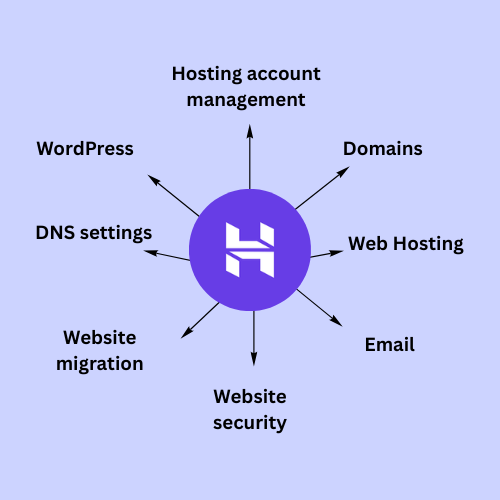
- Hosting account settings
- Domain-related issues
- DNS configuration
- WordPress installation
- Website migration
- Email setup
- SSL-related issues
- Hosting configuration
- Website availability
However, hosting support may not be able to fix every problem on your website. For example, a problem caused by poorly coded third-party plugins or custom website development may require help from a developer.
Understanding this difference is important when evaluating hosting support.
6. Is Hostinger Support Good for Beginners?
For beginners, having 24/7 support and access to online tutorials can be a major advantage.
If you are new to web hosting, you may not understand technical terms such as DNS, nameservers, SSL, or server settings. Support resources can help you understand what needs to be changed and how to make those changes.
This makes Hostinger a more beginner-friendly option compared with hosting services that provide limited guidance.
My Take on Hostinger Customer Support
One of the benefits of Hostinger is that beginners have multiple ways to find help. You can use the available support options when you need direct assistance, or use Hostinger’s tutorials when you want to solve an issue yourself.
However, your experience can vary depending on the type of problem and how complex it is.
Overall, this Hostinger Review 2026 shows that customer support is one of the useful features for beginners, particularly those who are creating their first WordPress website.
Before choosing a hosting plan, it is still a good idea to check the current support options and terms because hosting features and services can change over time.
8.Hostinger Pros and Cons
Before choosing a hosting provider, it is always a good idea to look at both the advantages and disadvantages. No hosting provider is perfect for everyone, and the right choice depends on your website, budget, technical requirements, and experience level.
In this Hostinger Review 2026, we have already looked at Hostinger’s pricing, features, performance, security, and customer support. Now let’s look at the main pros and cons of Hostinger.
1. Pros of Hostinger
Affordable Starting Prices
One of the biggest advantages of Hostinger is its affordable introductory pricing. This can make it attractive for beginners who want to start a website without spending a large amount on hosting.
If you are comparing different hosting options, you can also check my guide Best Cheap WordPress Hosting Deals – Starting From Rs.55/mo for more information about affordable WordPress hosting.
However, remember that introductory prices and renewal prices can be different, so always check the current pricing before purchasing.
Beginner-Friendly Interface
Hostinger provides a relatively simple hosting dashboard that makes it easier for beginners to manage their website.
You don’t necessarily need advanced technical knowledge to perform common tasks such as managing your domain, accessing website settings, checking hosting information, or managing other basic features.
This can be particularly useful if you are creating your first WordPress website.
Free SSL
Hostinger includes a free SSL certificate with its hosting plans.
SSL helps secure the connection between your website and its visitors and allows your website to use HTTPS.
For a new website, having SSL included with your hosting can save you from having to purchase and configure an SSL certificate separately.
Free Domain on Eligible Plans
Some Hostinger plans include a free domain for the first year, depending on the plan and eligible domain extension.
This can reduce the initial cost of starting a website because you may not need to purchase the domain separately.
If you want to learn more about this offer, you can read my detailed guide How to Get a Free Domain for 1 Year with Hostinger.
WordPress-Friendly Features
Hostinger provides features that can be useful for WordPress users, including WordPress installation tools and performance-related features.
This makes it easier for beginners to get their WordPress website online without dealing with complicated manual server configuration.
If you are completely new to WordPress, my guide How to Install WordPress Step by Step can also help you understand the installation process.
Performance Features
Hostinger provides performance-focused features such as SSD storage, LiteSpeed technology, caching options, and multiple server locations.
These features can help your website perform well when they are combined with proper website optimization.
However, your actual website speed will also depend on your theme, plugins, images, traffic, and other factors.
24/7 Customer Support
Hostinger provides customer support options that are available around the clock.
This can be especially helpful for beginners who may need assistance with hosting, domains, WordPress, or other technical issues.
Having access to support can make it easier to solve problems without having to figure everything out on your own.
2. Cons of Hostinger
Renewal Prices Can Be Higher
One important disadvantage to keep in mind is that the introductory price can be lower than the renewal price.
This means you may pay an attractive promotional price when you first purchase hosting, but the price can increase when your initial subscription period ends.
Before buying a plan, always check both the current introductory price and the renewal price so there are no surprises later.
Some Features Depend on the Plan
Not every Hostinger plan includes the same features.
For example, storage, number of websites, backups, email features, domain offers, and other resources can vary depending on the plan you choose.
Because of this, you should compare the plans carefully instead of choosing a plan based only on its lowest price.
Resources Are Limited on Shared Hosting
Shared hosting means that your website operates in a hosting environment where server resources are shared between multiple websites.
For a new blog or small website, this is usually sufficient. However, websites with very high traffic or resource-intensive applications may eventually need more powerful hosting.
If your website grows significantly, you may need to upgrade to a higher-tier plan or consider another type of hosting.
Advanced Users May Need More Control
Hostinger can be a good choice for beginners and many small websites, but advanced users with specific server requirements may want more control over their hosting environment.
If you need highly customized server configurations, specialized software, or advanced infrastructure, you should carefully compare Hostinger with hosting providers designed for more advanced use cases.
Hostinger Pros and Cons at a Glance
Pro
Affordable introductory pricing
Beginner-friendly dashboard
Free SSL
Free domain on eligible plans
WordPress-friendly features
Performance-focused tools
24/7 customer support
Cons
Renewal prices can be higher
Features vary by plan
Shared hosting has resource limits
Advanced users may need more control
Higher traffic may require an upgrade
Some features are available only on selected plans
Pricing and features can change
9.Is Hostinger Worth It for WordPress?
If you are planning to build a WordPress website, choosing the right hosting provider can make a big difference. A good hosting service should provide reliable performance, useful features, security, and enough resources for your website to grow.
Based on the features we have discussed so far, Hostinger Review 2026 shows that Hostinger can be a useful option for both beginners and more experienced WordPress users.
Hostinger for Beginners
For beginners, Hostinger offers several features that make starting a WordPress website easier.
You can install WordPress without complicated manual configuration, manage your hosting through a user-friendly dashboard, use a free SSL certificate, and access customer support when you need help.
If you are starting your first blog, personal website, portfolio, or small business website, you generally don’t need a highly advanced hosting setup.
Hostinger provides the basic tools you need to get your website online while keeping the management process relatively simple.
If you are completely new to WordPress, you can also read my guide How to Install WordPress Step by Step to understand the process of starting a WordPress setup.
Hostinger for Experienced WordPress Users
Hostinger is not limited to beginners. More experienced WordPress users can also benefit from its performance and website management features.
Experienced users may want more control over website performance, caching, domains, databases, backups, and other hosting settings. Depending on the hosting plan, Hostinger provides tools and resources that can support these requirements.
For example, users who manage multiple websites may benefit from hosting plans that allow multiple websites and provide additional resources.
Developers and experienced website owners can also use features such as database management, file management, DNS settings, PHP configuration, and other available hosting tools.
However, advanced users should carefully check the resources and technical features included with their selected plan. If you need complete server-level control or highly specialized infrastructure, a VPS or other advanced hosting solution may be more suitable.
Can Hostinger Handle a Growing WordPress Website?
One of the advantages of choosing Hostinger is that you don’t necessarily have to move to another provider as soon as your website starts growing.
You can start with a suitable entry-level plan and upgrade later if your website requires more resources.
As your website grows, you may need additional storage, more processing resources, higher traffic capacity, or other features. Upgrading your hosting plan can provide additional resources depending on the plan you choose.
This makes Hostinger a practical option for someone who wants to start small and increase their hosting resources as their website grows.
Hostinger for Blogs and Small Businesses
Hostinger can be suitable for many types of WordPress websites, including:
- Personal blogs
- Affiliate websites
- Portfolio websites
- Small business websites
- Service-based websites
- News and content websites
- Small online stores
- Professional websites
If you are planning to create an online store with WordPress, you may also find my guide How to Create an Online Store with WordPress useful.
The hosting requirements for each type of website can be different, so you should choose a plan based on your expected traffic, website size, and resource requirements.
Is Hostinger suitable for advanced websites?
For many experienced WordPress users, Hostinger offers sufficient features and resources for websites that have moved beyond the initial startup phase.
However, the definition of an “advanced website” can vary from user to user.
If your website receives significant traffic and requires more resources than a basic shared hosting plan offers, you can upgrade to a more robust hosting package.
On the other hand, websites requiring dedicated server resources, highly customized server configurations, or advanced infrastructure might need a more specialized hosting solution.
Therefore, advanced users should not rely solely on the brand name; instead, they should compare the actual server resources, technical features, scalability, and pricing of each plan.
Is Hostinger the right choice?
Overall, this Hostinger review for 2026 indicates that Hostinger is a great option for both beginners and experienced WordPress users.
Beginners can benefit from user-friendly tools, a WordPress-friendly setup, SSL, support, and easy website management.
Meanwhile, experienced users can take advantage of additional hosting tools, performance features, website management options, and upgrade paths as their needs grow.
The most important step is choosing the right plan for your website.
If you are just starting out, there is no need to pay for advanced resources that you won’t use. However, if your website is already growing, selecting a plan with more resources could be the better long-term choice.
My Verdict
So, is Hostinger the right choice for WordPress?
Yes, Hostinger is a great option for both new and experienced WordPress users, provided you select the right plan for your website’s needs.
For beginners, it offers an easy way to get started. For experienced users, higher-tier plans and available hosting tools provide greater flexibility as website requirements grow.
This makes Hostinger more than just a solution for absolute beginners; it serves as a flexible hosting option.
10.Who Should Use Hostinger?
Hostinger can be suitable for a wide range of website owners—whether they are building their first website or are experienced users managing multiple WordPress sites.
In this Hostinger review (2026), we have covered its pricing, features, performance, security, and support. Based on these factors, Hostinger is a great choice if you are looking for a hosting provider that offers user-friendly tools for beginners while also providing room for growth.
Here are some types of users who might find Hostinger beneficial:
Beginners building their first website
If you are creating your first website and lack extensive technical experience, Hostinger is an excellent option.
Its easy-to-use hosting dashboard, WordPress installation options, SSL certificates, and support resources simplify the initial setup process.
You do not need to understand advanced server management just to get a basic WordPress website online.
If you are completely new to WordPress, you can also read my guide, How to Install WordPress Step by Step, for a detailed walkthrough of the installation process.
Bloggers
Hostinger can be suitable for bloggers who want to create a WordPress website without spending too much on hosting in the beginning.
A typical blog may need hosting, a domain, SSL, storage, backups, and enough resources to handle visitors. Depending on the plan, Hostinger provides many of these features in one hosting account.
If you are planning to start a new blog, you can also check my guide How to Start a WordPress Blog with Hostinger.
Small Business Owners
Small businesses can also consider Hostinger for websites that don’t require highly specialized server infrastructure.
For example, a local business may need a website with information about its services, contact details, business hours, location, and a contact form.
A suitable Hostinger plan can provide the hosting resources needed for this type of website.
As the business website grows, you can also consider upgrading the hosting plan if additional resources are required.
Freelancers and Professionals
Freelancers, designers, developers, photographers, writers, and other professionals can use WordPress to create portfolio and professional websites.
Hostinger can be useful for these websites because it provides tools for managing domains, websites, email, files, databases, and other hosting settings.
A professional website does not always require expensive hosting, especially when it is relatively small and receives moderate traffic.
Affiliate Marketers
Hostinger can also be suitable for affiliate websites and content-based websites.
If you are building an affiliate blog, you may need reliable hosting for publishing articles, images, comparison tables, and other content.
As traffic increases, you can upgrade your hosting resources based on your website’s requirements.
If you are interested in affordable WordPress hosting for a new website, you can also read Best Cheap WordPress Hosting Deals – Starting From Rs.55/mo.
Small Online Store Owners
Hostinger can also be considered for small WordPress-based online stores.
If you are creating an online store with WooCommerce, your hosting needs may be higher than those of a simple blog because an online store can include product images, customer accounts, shopping carts, payment systems, and other dynamic features.
For a small store, a suitable Hostinger plan may provide enough resources to get started. As the store grows, you may need to upgrade to a plan with more resources.
You can also read my guide How to Create an Online Store with WordPress if you are planning to build a WordPress online store.
Experienced WordPress Users
Hostinger is not only for beginners.
Experienced WordPress users who understand website management, DNS, databases, caching, performance optimization, and other hosting settings can also use Hostinger.
Higher-tier hosting plans may provide additional resources and features that can be useful for growing websites.
However, experienced users should compare the technical specifications of each plan before purchasing, especially if they have specific server requirements.
Users Who Want to Start Small and Upgrade Later
Another type of user who may benefit from Hostinger is someone who wants to start with a smaller website and upgrade as it grows.
You don’t always need a high-resource hosting plan when launching a new website. Starting with a suitable plan can help keep your initial costs lower.
Later, if your traffic and resource requirements increase, you can consider upgrading to a higher plan.
This can be useful for bloggers, small businesses, affiliate marketers, and other website owners who expect their websites to grow over time.
Who Is Hostinger Best For?
Overall, Hostinger can be a good fit for:
- Beginners creating their first website
- WordPress bloggers
- Small business owners
- Freelancers and professionals
- Affiliate marketers
- Small online stores
- Experienced WordPress users
- Website owners who want the option to upgrade as they grow
The main thing is to choose a hosting plan based on your actual website requirements rather than choosing a plan only because it has the lowest starting price.
11.Who Should Avoid Hostinger?
Hostinger is suitable for various types of websites, such as blogs, business websites, portfolios, affiliate sites, and small online stores. However, since every website has unique requirements, the hosting plan you choose should align with your specific needs.
In this Hostinger review (2026), we have seen that Hostinger offers user-friendly tools for beginners alongside hosting options for websites that require significant resources.
Therefore, rather than asking whether you should avoid Hostinger entirely, it is better to consider whether the specific Hostinger plan you are selecting is the right fit for your website.
Users With Very Advanced Server Requirements
Some developers and businesses may need very specific server configurations or complete control over their server environment.
If your project requires highly customized server settings, specialized software, or advanced infrastructure, you should carefully compare the available hosting options and choose a plan that supports those requirements.
For regular WordPress websites, blogs, and business websites, these advanced requirements are generally not necessary.
Users With Very Advanced Server Requirements
If your project demands highly customized server settings, specialized software, or advanced infrastructure, you should carefully compare the available hosting options and select a plan that meets those specific needs.
Hostinger is a great option for both beginners and advanced users. Millions of websites are powered by Hostinger, and many businesses rely on its hosting services to build, manage, and grow their online presence.
Very Large Online Stores
A small or growing online store can work well with a suitable Hostinger plan. However, a very large e-commerce website with thousands of products, high traffic, and many simultaneous customers may require more server resources.
If you are starting a small WooCommerce store, you can begin with a suitable plan and upgrade as your store grows.
If you are planning to create an online store, you can also read my guide How to Create an Online Store with WordPress.
Users Who Only Compare the Starting Price
Another thing to keep in mind is that hosting prices can include promotional introductory rates. The renewal price may be different after the initial subscription period.
Therefore, if you are choosing a hosting provider only by looking at the lowest starting price, you should also compare the renewal price and included features.
This will help you understand the actual long-term cost of your hosting.
Does This Mean You Should Avoid Hostinger?
No, that is certainly not the case there is no reason to avoid using Hostinger.
This review of Hostinger indicates that if your website is growing or your requirements are more advanced, you should upgrade your Hostinger plan.
Hostinger offers a variety of hosting plans, allowing you to select the right one based on your website’s size, traffic, and specific needs.
A beginner can start with a suitable entry-level plan, while a growing website can switch to a plan with more resources as the need arises.
The most important thing is to choose the right plan rather than simply opting for the cheapest one.
Who Can Still Choose Hostinger Confidently?
Hostinger can be a strong option if you are:
- Starting your first WordPress website
- Creating a personal blog
- Building an affiliate website
- Running a small business website
- Creating a portfolio website
- Starting a small online store
- Managing a growing WordPress website
- Looking for beginner-friendly hosting
- Planning to upgrade your hosting as your website grows
If you fall into any of these categories, Hostinger can be worth considering.
For beginners who are looking for affordable WordPress hosting, you can also check my guide Best Cheap WordPress Hosting Deals – Starting From Rs.55/mo to compare important hosting features.
12.Hostinger for Beginners
If you are creating your first website, choosing web hosting can feel confusing. There are many hosting providers, different plans, technical terms, and features to compare.
This is where Hostinger can be useful for beginners. The platform is designed to make common hosting tasks easier, so you can focus on building your website instead of dealing with complicated server settings.
In this Hostinger Review 2026, we have already looked at Hostinger’s pricing, features, performance, security, and support. Now let’s see why it can be a practical choice for someone who is completely new to hosting.
Easy WordPress Setup
One of the first things beginners need to do after purchasing hosting is install WordPress.
Hostinger provides tools that make the WordPress setup process easier. You don’t have to manually configure everything from the beginning, which can be helpful if you have never worked with web hosting before.
Once WordPress is installed, you can log in to your WordPress dashboard and start creating pages, publishing blog posts, and customizing your website.
If you want a detailed step-by-step guide, you can read my How to Install WordPress Step by Step guide.
Beginner-Friendly Hosting Dashboard
Managing hosting can look complicated when you are doing it for the first time.
Hostinger provides a user-friendly dashboard where you can manage different parts of your hosting account. Depending on your plan, you can access options for your website, domain, email, SSL, backups, and other hosting features.
Having these settings organized in one place can make hosting easier to understand for beginners.
You don’t need to learn advanced server management just to perform basic tasks on your website.
Easy Domain Management
Your domain name is the address people use to visit your website.
Hostinger allows you to manage your domain and hosting from your account, which can make website management more convenient.
Some eligible hosting plans may also include a free domain for the first year.
If you want to understand how the free domain offer works, you can read my guide How to Get a Free Domain for 1 Year with Hostinger.
Free SSL Makes Things Easier
SSL is another feature beginners need when setting up a website.
Hostinger provides a free SSL certificate with its hosting plans, which helps secure the connection between your website and its visitors.
You don’t have to purchase a separate SSL certificate just to enable HTTPS on your website when the free SSL is included with your plan.
This makes the initial setup easier and can help your website look more trustworthy to visitors.
Support When You Need Help
Beginners will naturally have questions when they start working with hosting.
You may not know what DNS means, how to connect a domain, how to configure email, or what to do if something doesn’t work as expected.
Hostinger provides customer support and online tutorials that can help you find answers to common hosting questions.
Having access to these resources can make the learning process much easier when you are starting out.
You Don't Need Advanced Technical Knowledge
Another advantage for beginners is that you don’t need to understand everything about servers before creating a website.
You can start with the basics and learn more as your website grows.
For example, when you first start a WordPress blog, you mainly need to understand how to manage WordPress, publish content, install a theme, and use essential plugins.
You can learn more advanced hosting concepts later when you actually need them.
If you are planning to start your first blog, my guide How to Start a WordPress Blog with Hostinger can help you understand the basic process.
Suitable for Different Types of Beginner Websites
Hostinger is not limited to one type of website.
As a beginner, you can use it to create:
- A personal blog
- A portfolio website
- A small business website
- An affiliate website
- A service website
- A small online store
- A content website
If you are planning to create an online store, you can also check my guide How to Create an Online Store with WordPress.
The hosting plan you need will depend on the size and requirements of your website.
Start Small and Upgrade Later
Beginners often don’t know how much hosting resources they will need when they launch their first website.
The good thing is that you don’t necessarily need to purchase the most expensive plan from the beginning.
You can start with a plan that matches your current requirements and consider upgrading later if your website grows and needs more resources.
This can make it easier to control your initial hosting costs while giving your website room to grow.
Is Hostinger Good for Complete Beginners?
Overall, this Hostinger Review 2026 shows that Hostinger a good option for people who are completely new to web hosting and WordPress.
The combination of an easy-to-use dashboard, WordPress setup tools, free SSL, domain options, support resources, and upgrade options makes the overall process less complicated.
You still need to learn some basic WordPress concepts, but you don’t need advanced technical knowledge to get started.
My Take for Beginners
If you are buying hosting for the first time, Hostinger can be a practical starting point.
It gives you the tools needed to get a WordPress website online without requiring you to become a server expert first.
As you gain experience, you can learn more about website speed, SEO, security, backups, caching, and other advanced topics.
For this reason, Hostinger Review 2026 can be summarized for beginners in a simple way: if you want an easy starting point for a WordPress website and the flexibility to upgrade as your website grows, Hostinger is worth considering.
13. Hostinger vs Other Hosting Providers
When choosing web hosting, it is natural to compare Hostinger with other hosting providers before making a final decision. Different hosting companies offer different prices, features, performance, support, and resources.
In this Hostinger Review 2026, we have looked at Hostinger on its own. Now let’s see how it compares with other hosting providers and what you should consider before choosing one.
Hostinger vs Other Hosting Providers: What Should You Compare?
Instead of choosing a hosting provider only because it is popular, compare the features that actually matter for your website.
Here are some important things to compare:
- Starting price
- Renewal price
- Storage
- Number of websites allowed
- Free domain availability
- Free SSL
- Backups
- Performance features
- Customer support
- WordPress features
- Upgrade options
- Server resources
The cheapest hosting provider is not always the best option. A slightly more expensive plan may provide features that are more useful for your website.
Hostinger vs Bluehost
Hostinger is a popular hosting provider and a strong choice for both beginners and growing websites. It offers affordable hosting plans, an easy-to-use interface, and several WordPress-friendly features, making it a convenient option for users who want to get their website online without a complicated setup.
Bluehost is another well-known hosting provider that is popular among WordPress users. It also offers WordPress-focused hosting options and beginner-friendly features.
However, Hostinger can be a better choice if your priority is affordable pricing, easy website management, reliable performance, and a simple hosting experience. It is especially suitable for beginners who want to start a WordPress website without spending too much.
Bluehost may still be worth considering if you prefer its specific WordPress setup, features, or support options. However, for users looking for a more affordable and beginner-friendly hosting solution, Hostinger can be the better overall option.
Overall, Hostinger is a strong choice for beginners, bloggers, small businesses, and growing websites, especially when affordability and ease of use are important.
Hostinger vs SiteGround
Hostinger is a popular hosting provider that offers affordable plans, beginner-friendly tools, and WordPress-focused features. It can be a great choice for bloggers, small businesses, and anyone who wants reliable hosting without a high starting cost.
SiteGround is another well-known hosting provider, particularly among WordPress users who value website performance, security, and customer support.
However, Hostinger can be more attractive for users who want affordable hosting with a simple and easy-to-use experience. Its lower starting cost makes it especially appealing to beginners and users who are starting a new website on a budget.
SiteGround may be worth considering if you are comfortable paying more for its specific hosting features and support. However, if affordability, ease of use, and value for money are your main priorities, Hostinger can be the better overall choice.
Before choosing a hosting provider, compare more than just the introductory price. Check renewal costs, available resources, performance features, backups, security, customer support, and the features included with each plan.
Hostinger vs GoDaddy
Hostinger is a strong all-in-one hosting solution for beginners, bloggers, small businesses, and growing websites. It provides hosting management tools, WordPress features, domain options, SSL, website backups, and other useful features in one place, making it easy to manage a website.
GoDaddy is also a well-known company for domain registration and web hosting and is commonly considered by beginners.
However, Hostinger can be a better choice if you are looking for affordable hosting, an easy-to-use control panel, and a straightforward website setup. Its beginner-friendly tools make it easier to launch and manage a WordPress website without dealing with unnecessary complexity.
GoDaddy may be useful if you already use its domain or other services, but Hostinger can be more attractive for users who want an affordable and simple hosting experience.
Hostinger vs Other Affordable Hosting Providers
There are many hosting providers available today, including both budget-friendly and premium hosting companies.
Hostinger stands out mainly because it combines affordable introductory pricing with beginner-friendly tools and upgrade options.
For a new blog or small website, you may not need the most expensive hosting service available.
If you are specifically looking for affordable WordPress hosting, you can also check my guide Best Cheap WordPress Hosting Deals – Starting From Rs.55/mo.
Which Hosting Provider Is Best for Beginners?
For beginners, the best hosting provider is usually the one that makes it easy to:
- Purchase a hosting plan
- Register or connect a domain
- Install WordPress
- Enable SSL
- Manage the website
- Get help when needed
- Upgrade when the website grows
Hostinger performs well in these areas, which is one reason it can be a practical choice for people creating their first website.
If you are completely new to WordPress, you can also read my How to Start a WordPress Blog with Hostinger guide to understand how to get started.
Which Hosting Provider Is Best for Advanced Users?
Advanced users usually have different priorities.
They may care more about server resources, scalability, database performance, technical controls, caching, server configuration, and the ability to handle higher traffic.
Hostinger useful for experienced WordPress users, especially when they choose a hosting plan that provides the resources and features they need.
Hostinger vs Other Hosting Providers: Quick Comparison
Feature
Beginner-friendly setup
WordPress support
Free SSL
Free domain
Performance features
Customer support
Upgrade options
Advanced hosting options
Pricing
Hostinger
Yes
Yes
Available
Available on eligible plans
Available
Available
Available
Available
Competitive introductory pricing
Other Hosting Providers
Depends on provider
Usually available
Depends on provider
Depends on provider
Depends on provider
Depends on provider
Depends on provider
Depends on provider
Varies widely
So, Which One Should You Choose?
This Hostinger Review 2026 shows that Hostinger can be a strong choice if your main priorities are affordability, ease of use, WordPress compatibility, useful features, and the ability to upgrade as your website grows.
However, another hosting provider may be a better fit if it offers a specific feature that your website requires.
For most beginners, bloggers, small businesses, affiliate websites, and growing WordPress websites, Hostinger provides a practical combination of price and features.
14.Frequently Asked Questions
If you are still deciding whether Hostinger is the right hosting provider for your website, these frequently asked questions may help you make a better decision.
1.Is Hostinger good for WordPress?
Yes, Hostinger can be a good option for WordPress websites. It provides WordPress installation tools, SSL, performance features, website management tools, and customer support.
It can be suitable for beginners as well as experienced WordPress users, depending on the hosting plan they choose.
2.Is Hostinger good for beginners?
Yes. Hostinger is particularly beginner-friendly because it provides an easy-to-use hosting dashboard, WordPress setup options, SSL, support resources, and other tools that make website management easier.
You don’t need advanced technical knowledge to start a basic WordPress website with Hostinger.
3.Does Hostinger offer a free domain?
Hostinger offers a free domain for the first year on eligible hosting plans and selected domain extensions.
The exact offer can change, so you should check the current plan details before purchasing.
If you want to learn more, check my guide How to Get a Free Domain for 1 Year with Hostinger.
4.Does Hostinger include free SSL?
Yes, Hostinger provides a free SSL certificate with its hosting plans.
SSL helps secure the connection between your website and visitors and allows your website to use HTTPS.
5.Is Hostinger fast?
Hostinger provides several performance-focused features, including SSD storage, LiteSpeed technology, caching options, and multiple data center locations.
However, your actual website speed also depends on your theme, plugins, images, website design, traffic, and optimization.
6.Is Hostinger secure?
Hostinger provides several security features designed to help protect websites and hosting accounts, including SSL and protection against common online threats.
However, website owners should also keep WordPress, plugins, and themes updated and maintain regular backups.
7.Does Hostinger provide customer support?
Yes. Hostinger provides customer support and online resources to help users with hosting-related questions and problems.
Support availability and options can vary depending on the service and current policies.
8.Can I start a WordPress blog with Hostinger?
Yes. You can use Hostinger to start a WordPress blog.
If you are new to blogging, you can read my detailed guide How to Start a WordPress Blog with Hostinger to understand the basic process.
9.Can I create an online store with Hostinger?
Yes. You can use WordPress and WooCommerce to create an online store with a suitable Hostinger hosting plan.
However, online stores can require more resources than a simple blog, especially as traffic and the number of products increase.
You can also read my guide How to Create an Online Store with WordPress for a step-by-step overview.
10.Can I upgrade my Hostinger plan later?
Yes. If your website grows and requires additional resources, you can upgrade to a higher hosting plan.
This means you don’t necessarily need to purchase the most expensive plan when you are just starting.
11.Is Hostinger suitable for high-traffic websites?
Hostinger offers different hosting options, so its suitability depends on the traffic and resource requirements of your website.
A small website can start with a suitable plan, while a growing website may need a higher-resource plan.
For very large or highly specialized websites, you should compare the exact technical requirements with the resources provided by the hosting plan.
12.Is Hostinger worth it in 2026?
Based on the features discussed in this Hostinger Review 2026, Hostinger can be worth considering if you want affordable hosting with beginner-friendly tools, WordPress support, performance features, security options, and the ability to upgrade as your website grows.
The right choice ultimately depends on your website requirements and budget.
13.Is Hostinger good for advanced users?
Yes, Hostinger is not limited to beginners. Experienced WordPress users can also use Hostinger, especially when they choose a plan that provides the resources and features required for their websites.
However, users with highly specialized server requirements should compare the technical specifications of the available hosting options before purchasing.
14.What should I check before buying Hostinger?
Before purchasing a Hostinger plan, check:
- Introductory price
- Renewal price
- Storage
- Number of websites allowed
- Free domain eligibility
- SSL
- Backup options
- Website resource limits
- Performance features
- Customer support
- Upgrade options
Comparing these details can help you choose the right plan instead of simply choosing the cheapest option.
15. What Is the Best Hostinger Plan for a Beginner?
For most beginners, Hostinger Premium Web Hosting is a good choice for starting a WordPress blog, personal website, or small business website.
If you need more resources or want to host multiple websites, you can consider Hostinger Business Web Hosting.
For a new website, Premium is usually enough to get started, and you can upgrade later as your website grows.
15.Final Verdict
After looking at Hostinger’s pricing, features, performance, security, customer support, and WordPress compatibility, it is clear that Hostinger can be a practical hosting choice for a wide range of users.
Hostinger Review 2026 shows that Hostinger is not only suitable for beginners. It can also work well for experienced WordPress users who need more resources and advanced hosting features.
For beginners, Hostinger offers an easy-to-use dashboard, WordPress setup, free SSL, eligible free domain offers, customer support, and useful website management tools.
For growing websites and experienced users, Hostinger also provides higher hosting plans that can offer additional resources when your website needs them.
One important thing to remember is to choose your hosting plan based on your website’s actual requirements. Don’t choose a plan only because of its introductory price. Check the renewal price, included features, resources, and limitations before purchasing.
Overall, if you are planning to start a WordPress blog, small business website, portfolio, affiliate website, or growing online store, Hostinger is definitely worth considering.
If you are ready to get started, you can check Hostinger’s current hosting plans and choose the one that best fits your website.
My final verdict: Hostinger is a beginner-friendly, affordable, and flexible hosting option that can also support growing WordPress websites.